
Yes: every SME needs a short, enforceable password policy that focuses on multi-factor authentication, password managers or passkeys, deny lists and throttling rather than forced frequent changes. The NCSC advises against routine password expiry and recommends rotating only when there is evidence of compromise. Your first move should be enabling MFA across the business and choosing either a password-manager standard or a passkey-first approach.
TL;DR:
- Enabling multi-factor authentication on all internet-facing and admin accounts should be the top priority before implementing other controls.
- Using passkeys where supported improves security by removing shared secrets, while fallback options include strong, unique passwords with MFA.
- Password policies should specify a minimum of 12 characters or 8 characters with a deny list, avoiding complex rules that promote predictable passwords.
- Password resets should only occur after suspected or confirmed compromises, not on a fixed, routine schedule like 90 days.
- Continuous monitoring, throttling failed login attempts, and separating administrative from regular accounts are key controls to prevent brute-force attacks.
Table of Contents
- Key elements a practical SME password policy must include
- A plug-and-play password policy template and checklist
- How to enforce and maintain the policy day-to-day
- Legal and standards context for SME policies
- Abersecure perspective: how we help SMEs make this happen
- What SMEs consistently get wrong about password policy
- How Abersecure can help you put this into practice
- Sources
- FAQ
Key elements a practical SME password policy must include
A password policy earns its place only if people can follow it without working around it. Start with multi-factor authentication on every internet-facing account and anything with administrative access. SMS codes work, but authenticator apps or hardware keys resist interception better and cost nothing extra to deploy.
Passkeys are worth adopting wherever a service supports them, since they remove the shared secret entirely and are harder to phish. Where a platform has no passkey option yet, fall back to a strong, unique password stored in a manager plus MFA on the account.
Password managers deserve a firm policy position rather than a vague suggestion. Decide whether use is mandatory or merely recommended, require a long master password, and insist on MFA to protect the vault itself. The NCSC’s guidance on password managers sets out safeguards including regular updates and breach alerts, which make managers a genuine control rather than a convenience feature.
On password construction, Cyber Essentials gives you two workable routes: a minimum of 12 characters, or 8 characters combined with a deny list and automatic blocking of common passwords. Either satisfies the requirement, so pick whichever suits your systems and skip complexity rules that force symbols and numbers, since these tend to push staff towards predictable substitutions and password reuse.
Routine 90-day rotation should be dropped. Force a reset only after a suspected or confirmed compromise, since frequent mandatory changes encourage weaker, more memorable passwords rather than stronger ones.
- Require MFA on every internet-facing and administrative account before anything else.
- Set a minimum length of 12 characters, or 8 with a deny list, not both plus complexity rules.
- Make password managers mandatory or strongly recommended, with MFA on the vault.
- Reset passwords only after a suspected compromise, never on a fixed calendar.
- Apply throttling or lockout after repeated failed attempts and separate administrative accounts from everyday user accounts.
Pro Tip: Give staff a memorable method for the handful of passwords they must still create themselves, such as stringing together three random words, rather than leaving them to invent complexity on the spot.
Throttling and account lockout stop brute-force attempts before they succeed, and NCSC suggests limiting login attempts where your systems allow it. Device unlocking should use a PIN, biometric or passcode separate from network credentials, and administrative accounts should never double as everyday user accounts.
A plug-and-play password policy template and checklist
A policy only works if someone can read it in five minutes and act on it the same day. Use the following skeleton as a starting point and adjust it to your own systems.
- Scope: which systems, accounts and third-party services the policy covers.
- Responsibilities: who owns the policy, who enforces it, and who staff report issues to.
- Password rules: minimum length (12 characters, or 8 with a deny list), no forced complexity, no shared accounts.
- MFA and passkey requirements: mandatory MFA on internet-facing and admin accounts, passkeys where supported.
- Password manager guidance: approved tool, master password standard, mandatory MFA on the vault.
- Privileged accounts: separate credentials from standard user accounts, extra monitoring, tighter access review.
- Onboarding and leavers: credential issuance on day one, immediate revocation on departure.
- Incident-triggered resets: reset on suspected compromise, never on a fixed schedule.
- Review cadence: annual review, or sooner following an incident or major system change.
For rollout, work through a short checklist rather than trying to change everything at once.
- Pilot the policy with one team before a full rollout.
- Mandate MFA and communicate the deadline clearly.
- Check enforcement through spot audits of accounts and settings.
- Run a short training session covering password managers and phishing awareness.
Customise the detail to your own risk profile. Under UK GDPR, the ICO expects technical measures to be proportionate to risk, so a firm handling client financial data will justifiably set tighter controls than one running a small retail till system.
How to enforce and maintain the policy day-to-day
A policy that sits in a drawer protects nobody. Roll it out in phases: pilot with one department, gather feedback on friction points, then extend it business-wide once the process is smooth.
Keep training short and specific. A fifteen-minute session covering how to use the chosen password manager, how MFA prompts work, and how to spot a phishing attempt does more than a lengthy annual briefing nobody remembers.
- Track MFA coverage as a percentage of active accounts each month.
- Log deny-list hits and password reset requests to spot patterns.
- Review privileged account access quarterly, not annually.
- Confirm leavers’ credentials are revoked within the same working day.
Pro Tip: Treat a spike in failed login attempts or deny-list hits as an early warning sign, not just a helpdesk statistic.
When an incident occurs, force an immediate reset for affected accounts, log the event, and feed it into your wider incident response process rather than treating it as an isolated password problem.
Legal and standards context for SME policies
UK GDPR does not prescribe a specific password format. Instead, it expects organisations to apply measures proportionate to the risk of the data they hold, and weak password controls around sensitive personal data can count as evidence of inadequate safeguards if things go wrong.
Cyber Essentials gives SMEs flexibility rather than a single rigid rule.
- Choose broad MFA coverage as your primary control where systems support it.
- Alternatively, use the minimum-length and deny-list route where MFA is not yet feasible everywhere.
- Document whichever choice you make, since certification and audits will ask for the reasoning behind it.
NCSC and ICO guidance together give you a defensible basis: NCSC sets the technical detail, ICO frames the compliance expectation.
Abersecure perspective: how we help SMEs make this happen
The company has extensive experience building security in as standard rather than treating it as an afterthought. Their approach covers policy drafting, MFA and passkey rollout, and deploying password managers across a business.
Endpoint management and continuous monitoring can support the enforcement side by flagging failed login patterns and unusual account activity so a policy on paper turns into a control that actually holds.
What SMEs consistently get wrong about password policy
The advice that gets most attention, forcing password changes every 90 days, is the part NCSC guidance actively discourages. Businesses that still enforce it are often chasing a compliance habit rather than a genuine security gain, and the practical effect is weaker, more predictable passwords.
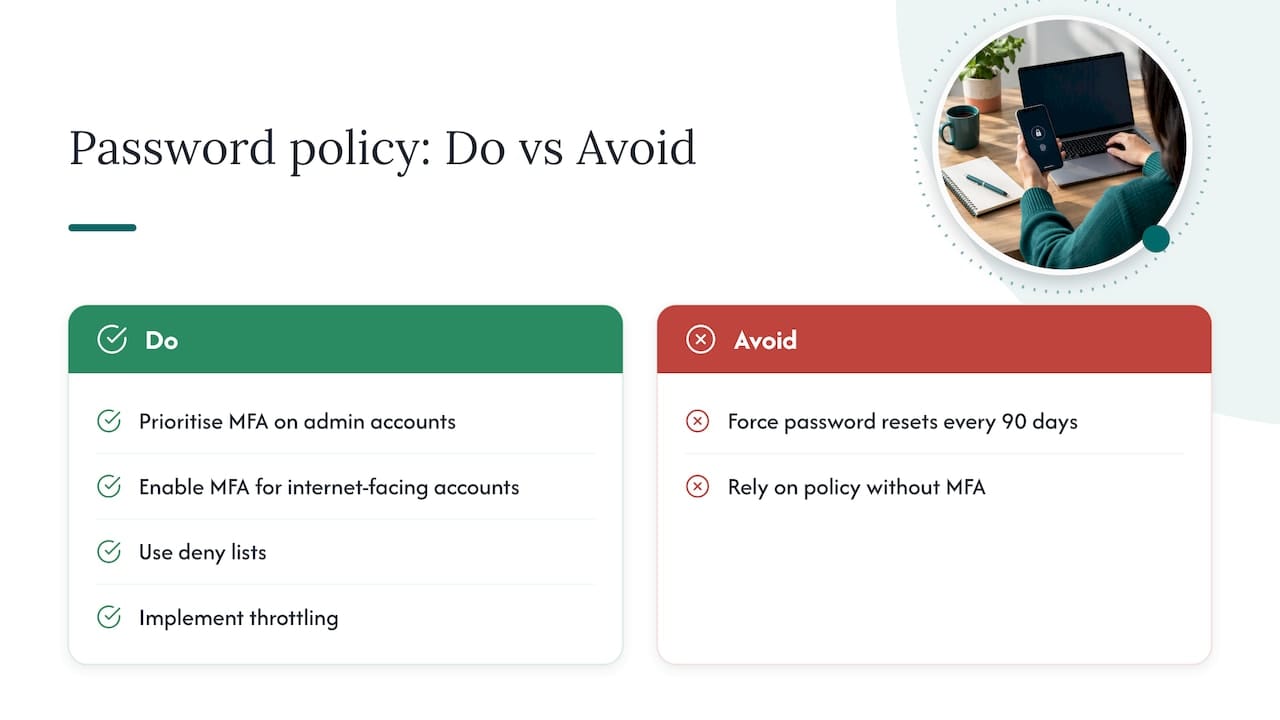
What deserves more attention is the boring middle ground: deny lists, throttling, and separating admin accounts from daily-use ones. These controls do not generate a training session or a headline policy line, yet they close the gaps that attackers actually exploit.
If you take one thing from this, prioritise MFA on admin and internet-facing accounts before anything else. A perfectly worded policy document with no MFA behind it protects nobody. Get that control in place first, then build the rest of the policy around it.
— Mustafa
How Abersecure can help you put this into practice
Managed IT support and managed cyber security services built around Security by Default can cover everything from policy drafting to ongoing endpoint monitoring.

- They can help draft the policy and roll out MFA or passkeys across your accounts.
- They monitor endpoints and accounts continuously and coordinate incident response when something looks wrong.
If you would rather have this handled for you than manage it in-house, get in touch through our managed IT support page or explore our managed cyber security services to see how a policy rollout would work for your business.
Sources
- Password administration for system owners — NCSC
- Passwords in online services — ICO / UK GDPR guidance
FAQ
What is the industry standard for password policy?
Current best practice, set out by NCSC, favours MFA on important accounts, a minimum password length of 12 characters (or 8 with a deny list), password managers, and resets triggered by suspected compromise rather than a fixed schedule. This replaces the older standard of frequent forced changes and heavy complexity rules.
What are some examples of password policies?
A typical SME policy covers scope, MFA requirements, password manager rules, minimum length or deny-list settings, privileged account separation, and reset triggers tied to incidents rather than time. The template in this article follows that structure and can be adapted to most small businesses.
What is the 8 4 rule for passwords?
There is no recognised “8 4 rule” in official NCSC or Cyber Essentials guidance. The closest documented standard is Cyber Essentials’ option of an 8-character minimum combined with a deny list and automatic blocking of common passwords, or 12 characters without one.
What are the five golden rules of password?
There is no single official “five golden rules” list, though NCSC guidance points to the same core practices repeatedly: use MFA, choose passkeys where available, use a password manager, avoid routine forced changes, and reset only after a suspected compromise.
Does Abersecure help SMEs set up a password policy?
Abersecure’s managed IT support and managed cyber security services include drafting password policies, rolling out MFA and passkeys, deploying password managers, and monitoring accounts for suspicious activity. Pricing for these services is available on request through the Abersecure packages page.