
Mobile device management, or MDM, is a centralised service that lets an organisation enforce security policies, protect corporate data and take administrative action such as a remote wipe across every laptop, tablet and phone that touches its systems. The NCSC recommends MDM as a primary control for devices that access or store business data, and the ICO sets out how that control must respect staff privacy. The sections below cover enrolment, legal considerations and a practical implementation checklist.
What mobile device management is and its core features
At its core, MDM gives IT teams one console to configure, monitor and protect every device that connects to company systems. Rather than visiting each laptop or phone individually, administrators push settings, track compliance and respond to incidents from a single platform.
The core feature set typically includes:
- Enrolment: registering a device into the management platform so policies apply automatically.
- Configuration and policy push: setting passcodes, encryption, Wi-Fi profiles and app restrictions remotely.
- App management: distributing approved business apps and blocking unauthorised ones.
- Remote wipe: erasing corporate data (or the whole device) if it is lost, stolen or decommissioned.
- Reporting and compliance: flagging devices that fall out of policy, such as those missing updates.
It helps to understand two related terms. Mobile application management (MAM) controls only the apps and data within them, useful when a business wants to protect work data without managing the whole device. Unified endpoint management (UEM) extends MDM principles to laptops, desktops and IoT devices under one platform. Most small and medium-sized businesses start with MDM and add MAM or UEM as their device estate grows, because the priority at the outset is usually straightforward: stop sensitive data leaving the business through an unmanaged device.
How MDM works: architecture and integration with identity systems
An MDM deployment has two sides: a management console that administrators use to set policy, and device-side components (an agent, a management profile or a platform API) that apply those policies on the device itself. Modern platforms increasingly use native operating system APIs rather than heavyweight agents, reducing battery drain and user friction while still giving IT the controls it needs.
What this looks like in day-to-day operation:
- The console defines policy: encryption requirements, app allow-lists, network settings.
- The device checks in periodically, applies updates and reports its compliance state.
- Device health signals feed into access decisions elsewhere in the business.
This last point matters more each year. NCSC guidance on Zero Trust recommends using device posture and attestation as inputs to a central policy engine, so a non-compliant device (missing an update, say, or lacking encryption) can be denied access to email or cloud systems automatically, rather than relying on MDM status alone as proof of trust. This is where MDM connects naturally with identity platforms such as Microsoft 365, since conditional access policies can use device compliance as one of their sign-in conditions.
Logging and monitoring matter just as much as configuration. Admins should watch for enrolment failures, policy drift, devices that go silent for extended periods and unexpected unenrolment attempts, all of which can indicate a compromised or mismanaged device.
Enrolment approaches and deployment models
How a device gets enrolled affects how much control a business retains over it. There are three broad approaches, and the NCSC’s enrolment guidance sets these out clearly.
- Admin enrolment: IT manually enrols each device before handing it over, giving full control but demanding staff time for every unit.
- Self-enrolment: users enrol their own device by following instructions, which scales well but depends on compliance and clear guidance.
- Zero-touch enrolment: devices are pre-registered with a vendor programme and enrol automatically on first power-up, straight out of the box.
Zero-touch is recommended for larger fleets because it reduces administrative error and secures devices while still in transit. Programmes to know include Apple Business Manager, Android zero-touch, Samsung Knox Mobile Enrolment, Windows Autopilot and Chrome OS White Glove. One practical gap worth planning for: when devices ship directly to end users rather than through IT, asset tracking can fall behind unless procurement, vendor assignment and digital registration are linked from day one.
Deployment model shapes this further. Corporately owned, business only (COBO) devices give full technical control since no personal use is permitted. Corporately owned, personally enabled (COPE) devices allow limited personal use within a managed, segregated profile. Bring your own device (BYOD) gives the least technical control, since the business does not own the hardware, which shifts the emphasis towards app-level controls rather than full device management.
Pro Tip: Match your enrolment method to your procurement process before you order hardware, not after. Retrofitting zero-touch onto devices already in staff hands is far harder than setting it up at the point of purchase.
BYOD, privacy and legal considerations
Allowing staff to use personal phones and tablets for work can reduce hardware costs, but it raises genuine privacy questions that UK organisations need to resolve before rollout, not after a complaint arrives. The ICO’s BYOD guidance is specific on this: controls must be proportionate, a data protection impact assessment (DPIA) should be carried out where appropriate, and staff must be clearly told about monitoring and remote-locate or remote-wipe capabilities before enrolment.
Several practical measures help reconcile business security with personal privacy:
- Work profiles or containerisation: separate business apps and data into a distinct, encrypted container on the personal device.
- MAM instead of full MDM: manage only the work apps, leaving the rest of the device untouched by policy.
- Scoped remote wipe: configure wipe actions to remove only the corporate container, not personal photos, messages or accounts.
- An acceptable use policy (AUP): document what is monitored, what is not, and what happens when a device is lost or an employee leaves.
Clear, written communication at enrolment time converts these regulatory expectations into something staff understand and accept, which reduces pushback and disputes later.
How to choose and implement an MDM: a practical checklist
Selecting an MDM platform comes down to three areas: technical fit, security fit and how you run the rollout.
- Device and OS support: confirm the platform manages every operating system in your estate, including OEMConfig support for Android and update management across iOS, Android and Windows.
- Enrolment authentication: require multi-factor authentication (MFA) at enrolment so a stolen credential cannot register a rogue device.
- Logging and monitoring: check the platform exports logs to your existing monitoring tools rather than locking data in a separate silo.
- Device attestation: confirm the platform can report device health signals to your identity and access systems.
- DLP and app controls: verify data loss prevention features and app allow-listing match your risk appetite.
- Pilot before full rollout: test with a small group across each device type, define success criteria, and only then scale.
- Governance: finalise your AUP and DPIA alongside the technical rollout, not as an afterthought once devices are already enrolled.
On procurement, weigh cloud-hosted against on-premises deployment, agree clear SLAs with your vendor, and decide how asset tracking will integrate with your enrolment method from the outset, which matters most with zero-touch programmes. Our own guide to device lifecycle management covers how these governance points fit into the wider lifecycle, from procurement to decommissioning.
Pro Tip: Run your pilot across your least forgiving device type first, usually the oldest Android models in the estate, since compatibility issues surface there before anywhere else.
Operational best practice and integrating MDM with Zero Trust
Once MDM is live, the work shifts from deployment to maintenance. Device compliance signals should feed directly into conditional access policies, so a device that falls out of compliance (through a missed update or a jailbreak attempt, for example) loses access to sensitive systems automatically rather than waiting for a manual review.
Day-to-day practice should include:
- Including managed devices in the same logging and protective monitoring as servers and cloud accounts, not treating them as a separate category.
- Maintaining a firmware and OS update schedule rather than relying on users to install updates themselves.
- Testing remote-wipe and unenrolment procedures regularly, including during onboarding, so they work when actually needed during an incident.
Three mistakes come up repeatedly. Relying on vendor default settings instead of configuring policy to match your own risk appetite is one, since NCSC guidance is explicit that MDM is not a set-and-forget control. Weak enrolment authentication is another, since an MDM platform is only as secure as the credentials used to register devices into it. The third is failing to link asset management with zero-touch enrolment, which leaves gaps in the device inventory precisely where visibility matters most.
Pro Tip: Add remote-wipe and unenrol procedures to your incident response playbook explicitly, with named owners, so nobody has to work out who holds the authority to act during a live incident.
User training and awareness related to MDM policies
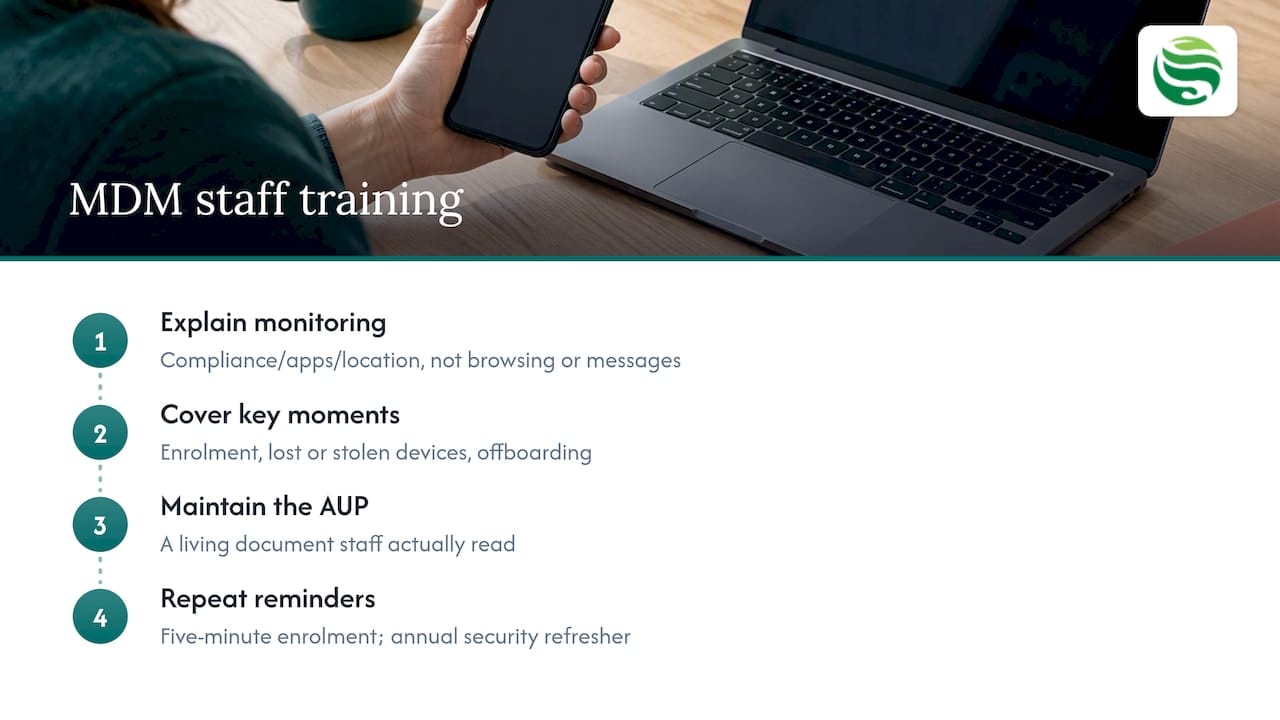
Technical controls only go so far if staff do not understand why they exist. A member of staff who finds MDM intrusive or confusing is more likely to attempt a workaround, which defeats the purpose of the policy entirely.
Effective training covers three things. First, explain what is and is not monitored: most MDM deployments track device compliance, app inventory and location for lost-device recovery, not personal browsing history or message content, and saying so plainly removes a common source of anxiety. Second, walk staff through what happens at key moments: enrolment, a lost or stolen device, and offboarding when they leave the business. Third, make the acceptable use policy a living document that staff actually read, not a clause buried in a contract signed on day one.
Short, repeated reminders work better than a single long induction session. A five-minute explanation at enrolment, followed by a brief refresher during annual security awareness training, keeps the policy visible without becoming background noise. Where a business runs broader security awareness training, MDM policy fits naturally alongside phishing awareness and password hygiene, since all three address the same underlying goal: reducing the gap between what the business expects and what staff actually do with their devices.
Getting this right also reduces support overhead, since staff who understand what to do when a device is lost report it faster, which shortens the window in which corporate data sits on an unmanaged device.
Handling different device operating systems within MDM
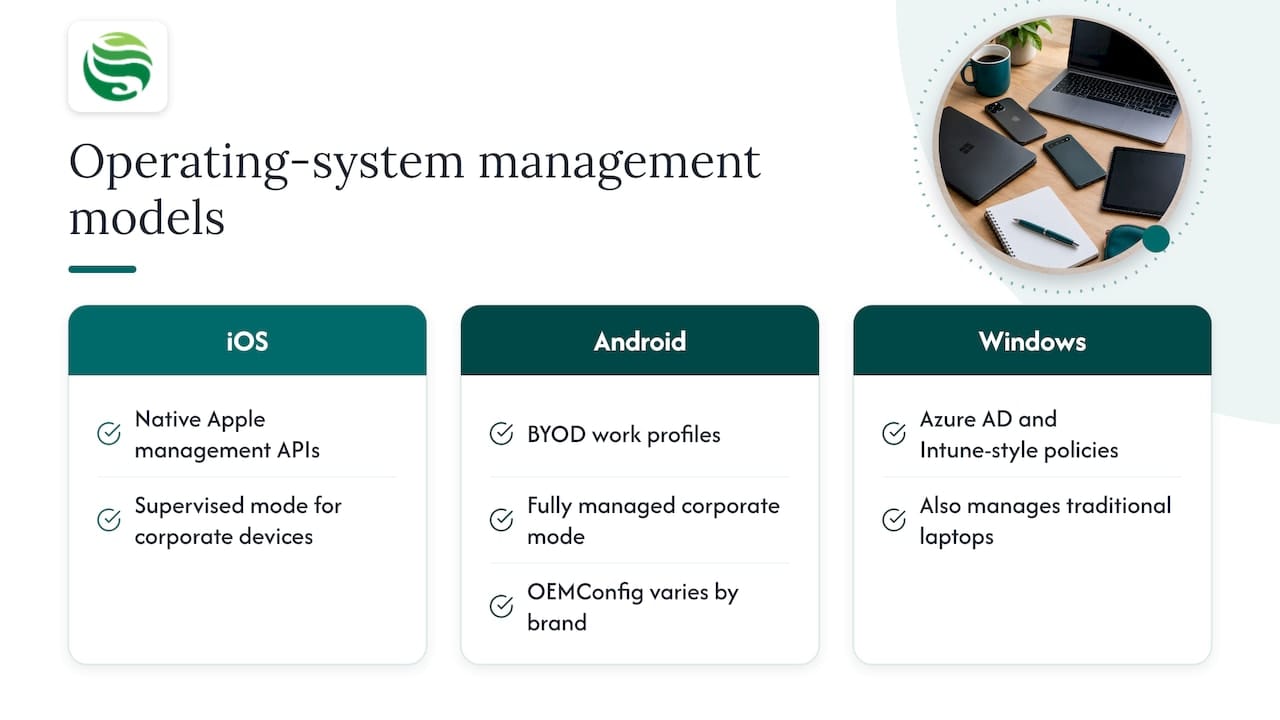
Most business estates mix iOS, Android and Windows devices, and each platform has its own management model, which an MDM policy needs to account for rather than treat as uniform.
iOS devices rely heavily on Apple’s native management framework, so most controls (passcode policy, app distribution, supervised mode for corporately owned devices) are applied through Apple’s own APIs rather than a heavyweight agent. Android’s picture is more varied: Android Enterprise supports distinct work profiles for BYOD and fully managed modes for corporate devices, and OEMConfig support matters here because manufacturer-specific features vary between brands. Windows devices typically use mobile device management protocols integrated with Azure Active Directory and Intune-style policy, which also extends to traditional laptop management rather than being phone specific.
The practical implication is that a single policy document should define outcomes (encryption required, passcode minimum length, remote wipe available) rather than platform-specific mechanisms, with the MDM platform translating that outcome into the right technical setting for each operating system. NCSC’s platform security guidance recommends choosing supported devices and keeping pace with manufacturer update schedules, since support lifecycles differ by vendor and directly affect how long a device can be safely kept in service. A business running a mixed estate should check that its MDM platform maintains full parity of core controls (encryption, remote wipe, compliance reporting) across all three platforms, since gaps tend to appear quietly on whichever platform receives less administrative attention.
Data backup and disaster recovery in an MDM context
MDM protects devices and the policies applied to them, but it is not a backup strategy on its own. A remote wipe, whether triggered deliberately after a loss or accidently during a misconfiguration, removes data permanently unless that data was already backed up elsewhere.
The practical approach separates two concerns. Corporate data that lives in cloud services such as Microsoft 365 is backed up and recovered through that platform’s own retention and backup tools, independent of the device itself. Data stored locally on the device, which a well-designed policy should minimise, needs its own backup path, whether through automatic cloud sync for business apps or a managed backup and disaster recovery service that covers the wider business estate.
Disaster recovery planning should treat device loss as a routine event rather than an edge case, since phones and laptops are lost, stolen or damaged far more often than servers fail. A recovery plan that assumes a device can be wiped and replaced within hours, with the user back to full productivity on a freshly enrolled device, reduces the operational impact of what is otherwise one of the most common incident types a business will face. Testing this process, not just assuming it will work, is the detail that most policies miss until the first real incident exposes the gap.
How we help you put MDM to work
Getting MDM right means treating it as part of a wider security posture, not a standalone tool bolted onto existing IT. Security by Default is built into our support packages, meaning device management, monitoring and policy enforcement are treated as standard practice rather than optional extras. With over 19 years of experience, we bring that same operational discipline to endpoint management with 24/7 secure device monitoring, covering enrolment, policy enforcement and ongoing compliance checks across your device estate, alongside Microsoft 365 management so device compliance and identity controls work together rather than in isolation.
If you are weighing up where to start, a cyber risk assessment is a practical first step: it identifies which devices and data need the most protection before you commit to a platform or a rollout plan. From there, a pilot group or a full managed IT support engagement gives you a clear path to a managed, monitored device estate without having to build that capability in-house.
FAQ
Can MDM be permanently removed?
Yes, a device can be unenrolled from MDM, either by the user (if permitted by policy) or by an administrator. On corporately owned devices, unenrolment is usually restricted or triggers an automatic wipe to prevent data walking off an unmanaged phone.
How do I know if my phone has mobile device management?
Check your device settings for a management profile, often labelled “Device management” on iOS or listed under “Work profile” or “Device admin apps” on Android. Most platforms also display a notice at login or in notification settings confirming the device is enrolled.
Is MDM an invasion of privacy?
MDM itself is a policy enforcement tool, and whether it intrudes on privacy depends entirely on how a business configures and communicates it. ICO guidance requires proportionate controls, a DPIA where appropriate, and clear notice to staff about what is monitored, particularly for personally owned BYOD devices.
What is mobile device management for?
MDM exists to secure, configure and monitor the phones, tablets and laptops that connect to a business’s data and systems from one central console. Its core purpose is protecting corporate data, which it does through enforced policies, remote wipe capability and compliance reporting, as NCSC guidance sets out for organisations selecting and deploying these services.