

A patch management policy is a short, written rule set that says what you patch, how fast, who is responsible and how you prove it happened. For a UK small or medium-sized business, the policy has to reflect a hard deadline: under current Cyber Essentials rules, high-risk and critical security updates must be installed within 14 days of release. This guide sets out what your patch management policy should contain, where businesses usually go wrong, and how to make the document work in daily operations rather than sit in a folder.
What a patch management policy needs to say
Keep it to a few pages. A policy that nobody reads cannot be enforced. At minimum, cover these six points:
- Scope. Which devices, operating systems, applications, cloud services and network equipment the policy covers.
- Roles. Who approves, who deploys and who checks. Name a role, not just a department.
- Timescales. How quickly each category of update must be installed.
- Testing and rollback. How you check that an update will not break a business-critical system, and what happens if it does.
- Exceptions. What happens when a system cannot be patched, and who signs that off.
- Verification and reporting. How you confirm the patch actually landed.
The NCSC’s guidance on vulnerability management is a sound reference point for all six. Its first principle is to put in place a policy to update by default: apply updates as soon as possible, and ideally automatically.
Set the scope wider than you think
Many businesses write their patch management policy around Windows laptops and stop there. The NCSC treats vulnerability fixes more broadly: registry changes, configuration tweaks, scripts and firmware all count, as the Cyber Essentials question set makes clear. In practice, critical flaws often sit in router or firewall firmware, which needs manual attention.
Your scope list should therefore include:
- Windows and macOS workstations, and any servers
- Microsoft 365 apps, browsers, PDF readers and other third-party applications
- Browser extensions and scripts
- Routers, firewalls and switches (firmware)
- Mobile devices that access company data
- Cloud-hosted systems where you are responsible for the configuration
Third-party software deserves its own line. Windows Update does not cover most of it, so the policy should say how those applications are tracked and updated. Without that line, they become the gap an attacker finds first.
Keep related hygiene in view as well. Email authentication, for example, is a separate control but sits alongside patching in a sensible security baseline; this guide to email security compliance for UK businesses is useful if you want to extend your review beyond devices.
Timescales: the 14-day limit is a ceiling, not a target
For Cyber Essentials, the rule is precise. Critical or high-risk updates (CVSS v3 base score of 7 or above, or labelled critical by the vendor) must be installed within 14 days. Missing it for operating systems, firmware or applications is an automatic fail.
The NCSC’s view is that you should aim well below that. Treat 14 days as the limit for your slowest manual updates, and set shorter targets for everything that can be automated. A simple tiered table works well:
| Category | Suggested approach in your policy |
|---|---|
| Critical or high-risk, actively exploited | Emergency process; deploy as soon as it is tested, well inside 14 days |
| Critical or high-risk, not known to be exploited | Automatic deployment where possible; manual items inside 14 days |
| Medium and low | Routine monthly cycle |
| Firmware and network devices | Scheduled check plus manual deployment, recorded |
The exact figures for the lower tiers are your decision. Choose numbers you can actually meet and measure, then write them down.
Exceptions, end-of-life software and supported versions
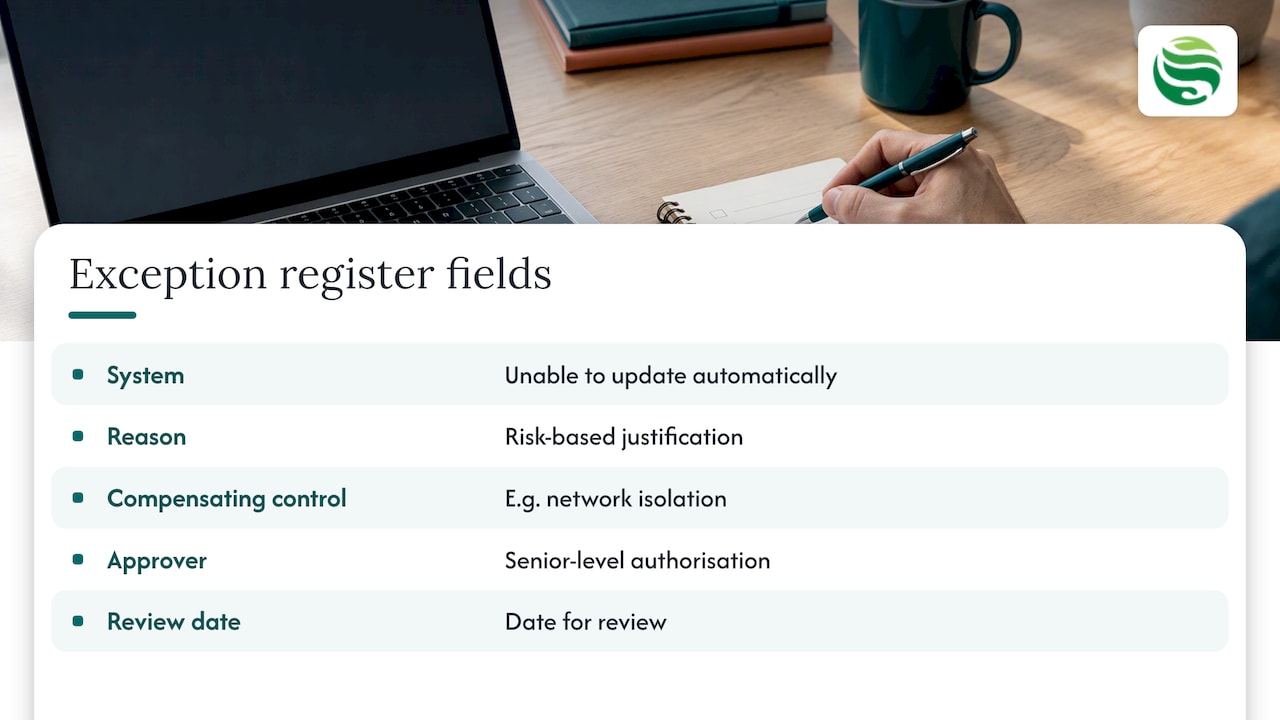
The NCSC expects an update-by-default approach, with formal, risk-based exceptions authorised at a senior level for systems that cannot be updated automatically, such as specialist or safety-critical equipment. Your policy should include an exception register with the system, the reason, the compensating control (for example, network isolation), the approver and a review date.
End-of-life software needs the same discipline. Cyber Essentials requires software to remain licensed and supported by the vendor. Running Windows 10 beyond 14 October 2025 without an active Extended Security Update subscription fails certification. Add a standing task to your policy: keep a register of end-of-life dates for every operating system, application and device, and review it quarterly.
The NCSC also makes a supply-chain point worth including. Security updates should be available as standard for the supported life of the software. If a supplier treats them as a premium extra, reassess your reliance on that product.
Prove it works: verification and the whole-estate rule
This is where most policies fall short. Automatic updates are the preferred method, but they can fail silently because of low disk space, a pending reboot or a power loss. The NCSC device security guidance is clear that updates must actually be installed, so a setting enabled in a console is not evidence. Your policy should require one of:
- Monitoring or reporting from a central management tool that shows patch status per device
- Periodic manual spot checks
- Both, with a named person reviewing the report each month
The NCSC also calls for a verification and review step: after a fix, confirm the vulnerability is gone, and review the process as your estate and the threats change. Independent penetration testing is one way to check that your policy performs as intended.
One more trap: patching only the machines likely to be inspected. Cyber Essentials Plus assessors are trained to reject this. If a sampled device shows a vulnerability that points to wider neglect, the whole assessment can fail. Apply the policy across the entire estate, every time.
Turning the policy into routine
A written policy only reduces risk when someone runs it. For many SMEs without an in-house IT team, that is the real obstacle. The practical options are:
- A named internal owner with a monthly patch report and a deputy for absences.
- A managed provider that deploys, monitors and reports as part of ongoing support.
- Ad hoc help for a one-off policy review or a catch-up on a backlog.
At Abersecure we provide patch management and endpoint management for businesses in Aberdeen and Aberdeenshire, with 24/7 device monitoring that gives you the reporting a policy depends on. Security is built into our support packages by default rather than added later; you can compare the Professional, Advanced and Enterprise packages or look at our managed IT support service. If you only need help drafting or auditing a policy, pay as you go IT support is the simpler route. Talk to us about which fits your size and risk.
If you are deciding between certification routes, our comparison of Cyber Essentials and ISO 27001 explains how each treats patching.
Frequently asked questions
How often should a patch management policy be reviewed?
Review it at least once a year, and whenever your estate changes significantly, for example after moving to new cloud services or replacing network equipment. The NCSC describes vulnerability management as an evolving process, so the policy should change with your systems and the threats you face.
Does a patch management policy cover third-party software?
It should. Operating system updates are only part of the picture; browsers, PDF tools, collaboration apps and extensions all carry vulnerabilities. The policy should state how each is tracked, updated and verified, and who is responsible.
Is automatic updating enough on its own?
No. Automatic updates are the preferred approach, but they can fail silently. Your policy needs a verification step, such as central reporting or periodic checks, to confirm updates have reached each device.
What happens if we miss the 14-day window for Cyber Essentials?
Failing to install critical or high-risk updates within 14 days results in an automatic assessment failure for operating systems, firmware or applications. If a system genuinely cannot be patched, document it as a managed exception and speak to your assessor or IT provider about the right control.