
Employee IT offboarding is the process of closing a leaver’s access, recovering their devices and securing their data, so that nothing they could reach on Monday is still open on Tuesday. Done well, it is a short, planned project with a fixed end date. Done badly, it leaves live accounts, unreturned laptops and files nobody owns. If you want the routine handled for you as part of managed IT support in Aberdeen, our team can run it alongside your day-to-day support. The checklist below works either way.
Why IT offboarding matters
A leaver who keeps access is a security gap and a data protection problem. Under UK GDPR, an organisation remains responsible for personal data a departed employee could still reach, and lingering access is a demonstrable failure of that duty.
The financial stakes are real too. IBM’s Cost of a Data Breach Report 2026 puts the UK average cost of a breach at USD 4.17 million for breaches between March 2025 and February 2026. That is an average across all sizes of organisation, but it shows why loose ends are worth closing.
Most offboarding mistakes are planning mistakes: an account nobody knew about, a laptop nobody asked for. So the work starts before the last day.
Before the last day: plan and inventory
- Confirm the date and time. HR confirms the separation date and effective time, and IT schedules credential rotation and assigns a recipient for each file before the person leaves.
- Build an inventory of accounts and devices. List the directory account, email, cloud apps, VPN, shared passwords, admin rights, phones, laptops, tokens and keys. Include accounts held outside single sign-on, because they are the ones that get missed.
- Set the access deadline in writing. Trio’s example sets the cut-off at the day after the last day for voluntary leavers and the same day for involuntary exits and admins. Choose your own rule and record it.
- Match the response to the risk. The National Protective Security Authority (NPSA) says options range from full access during notice to reduced access or supervised immediate departure, and that unnecessary restrictions may cause ill-feeling, so actions should be proportionate. A resignation to a competitor and a retirement call for different handling.
If your inventory depends on someone’s memory, it will be incomplete. Managed endpoint management gives you a device record to start from, so you are checking a list rather than building one.
On the last day: revoke access in the right order
Order matters. The NPSA lists the access to remove at exit: user IDs, email accounts, shared passwords, security passes, door codes, signature authority and company cards.
In practice, work through this sequence:
- Disable the main identity account first (Microsoft Entra ID or Google Workspace, for example), so single sign-on apps close with it. Disable rather than delete: a disabled account can be restored if HR got the date wrong, while a deleted one usually cannot.
- End live sessions and remove MFA methods. Tokens and OAuth grants act as the person and can outlive a suspended account, so revoke them explicitly.
- Sweep access outside the identity system: non-SSO apps, privileged accounts, personal API and SSH keys and VPN. Change shared passwords even when you trust the person.
- Redirect or delegate email and files to the named recipient, and obtain passwords or encryption keys for files they were working on, as the NPSA advises at the exit interview.
- Change door codes and combinations to shared areas.
Only admin rights held by a few people need extra care. If your Microsoft 365 admins rely on a small set of accounts, our guide to Microsoft 365 MFA for UK admins explains how to keep emergency access safe when one of them leaves. A strong SME password policy also makes shared-credential changes quicker.
Recovering devices and company assets
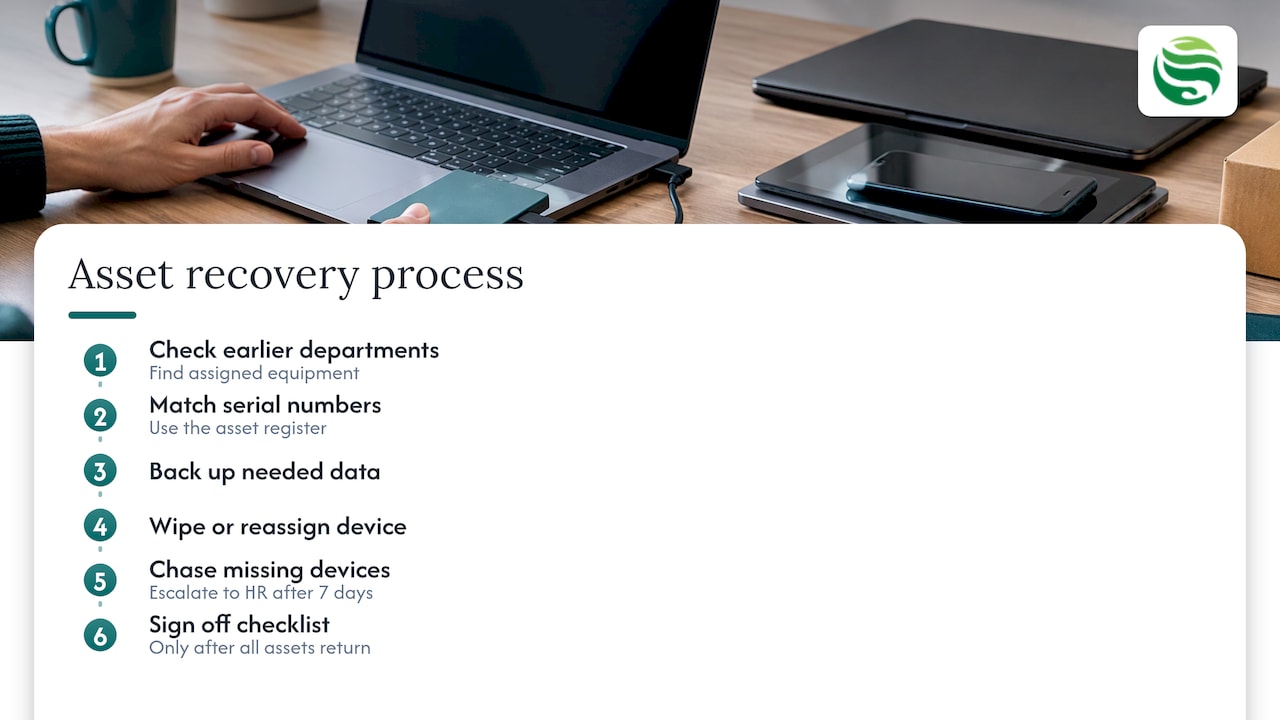
The NPSA’s exit checklist covers ID cards, company phones, laptops and other IT equipment, company credit cards, access tokens, sensitive papers and keys to secure storage. It adds that the checklist should be signed off only when all assets are returned, and that earlier departments should be checked for assigned equipment.
Check serial numbers against your asset register rather than counting boxes. Then back up anything the business needs to keep, and wipe or reassign the device. Trio suggests chasing unreturned devices and escalating to HR after 7 days.
Personal devices need a decision too. The NCSC says that where a departure is in scope of possible redundancy, organisations should ensure recovery of official devices and closure of accounts, including BYOD arrangements. A written device management policy settles this before anyone leaves, and our endpoint protection service covers business devices.
Data, retention and the UK GDPR
Former employees keep their data rights. They can ask for access, correction, erasure, restriction, portability and objection, and a subject access request must be answered within one calendar month, extendable by up to two further months only for complex or multiple requests.
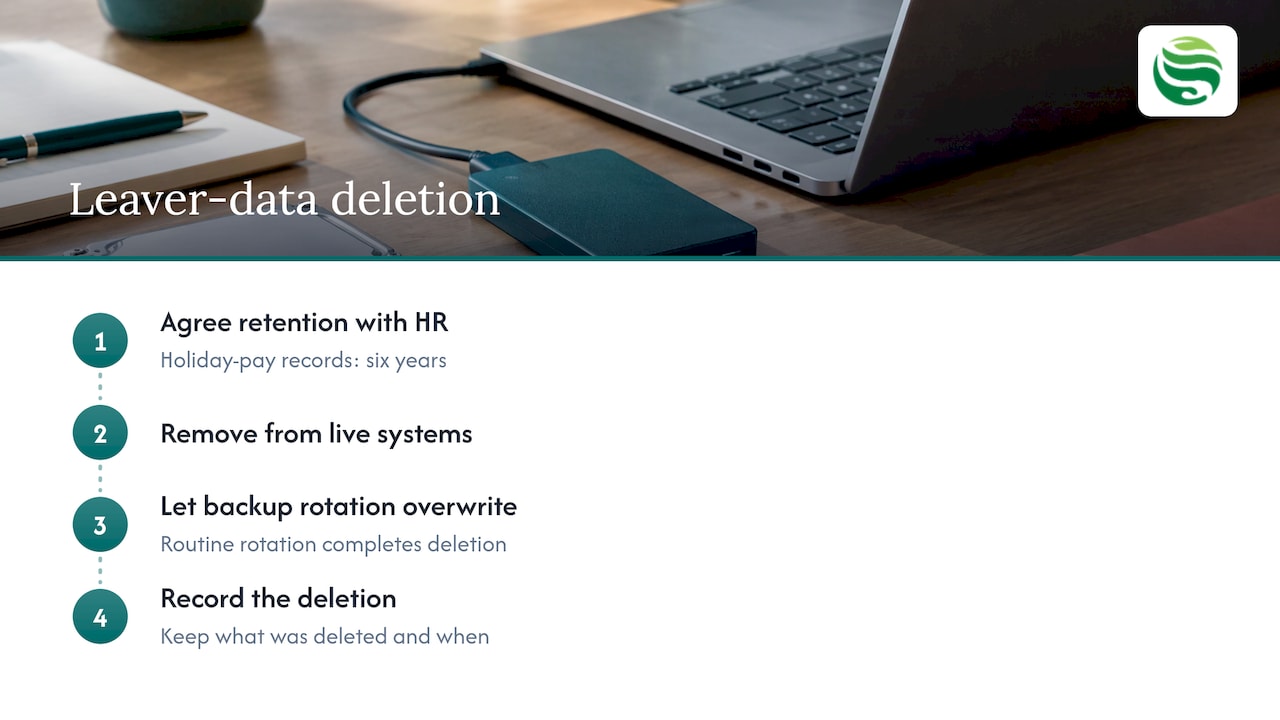
For leaver data, the same guidance recommends two-stage deletion: remove it from live systems, then let routine backup rotation overwrite it, keeping a short record of what was deleted and when. Agree the retention period with HR before you delete any mailbox. For example, annual leave and holiday pay records must be kept for six years under the Working Time Regulations 1998, in force from 6 April 2026.
Backups matter here, because deletion and recovery pull in opposite directions. See our data backup strategy for how to set retention without losing what you must keep. Questions about a specific employee’s records belong with your HR adviser or solicitor.
After they have gone: verify and record
Offboarding is not finished when the account is disabled. Verify it.
- Review access. Run an access review against the person’s identity across major systems and check sign-in activity for anything after the cut-off.
- Watch the logs. Trio suggests checking sign-in logs for 30 days after the last day.
- Look back, too. The NPSA, writing for critical national infrastructure, recommends reviewing activity for the 30 days before the organisation learned of the departure.
- Close the record. Confirm every task has a named owner and timestamp, and store the record where it can be retrieved later.
- Update the documents. Remove the leaver’s name from runbooks, licence lists and the asset register.
If you keep a leaver file with the signed checklist and the system evidence behind each line, you can answer an auditor or a client security questionnaire without reconstructing events months later.
Making offboarding routine
The pattern above is the same for every leaver, which is why it suits a managed service. Our Managed IT Support covers Microsoft 365 management, endpoint and patch management and a help desk, and Security by Default is our standard practice across support packages. If you only need help when someone leaves, pay as you go IT support is available, and the packages page lists the options, including out of hours IT support. Pair this with our employee IT onboarding checklist so joiners and leavers follow one process.
FAQ
What should be on an IT offboarding checklist?
Cover five areas: a pre-departure inventory, access revocation, device and asset recovery, data handling, and post-departure verification. The sections above set them out in order, with the owner for each task named on the record.
Should we delete the leaver’s account straight away?
No. Disable it first and delete only after the retention period agreed with HR. A disabled account can be restored if the date was wrong and keeps mailboxes and sign-in history available.
How quickly should access be removed?
Set the deadline in writing according to the type of departure. A common pattern is the same day for involuntary exits and administrators, and by the next day for voluntary leavers. Whatever you choose, apply it consistently and record it.
Do leavers still have data rights?
Yes. Under UK GDPR, former employees can still make subject access requests and exercise other rights, so keep your leaver records organised and your retention schedule documented.