
Single sign-on (SSO) lets your staff log in once and reach every connected business application without a separate password for each. For a small business it is worth having when your team uses several cloud tools, people join and leave regularly, and you want access controlled from one place. It only works safely when the central login is protected and someone owns it. That is where managed IT support from Abersecure fits: we build security in from the outset, under our Security by Default approach.
How single sign-on works for a small business
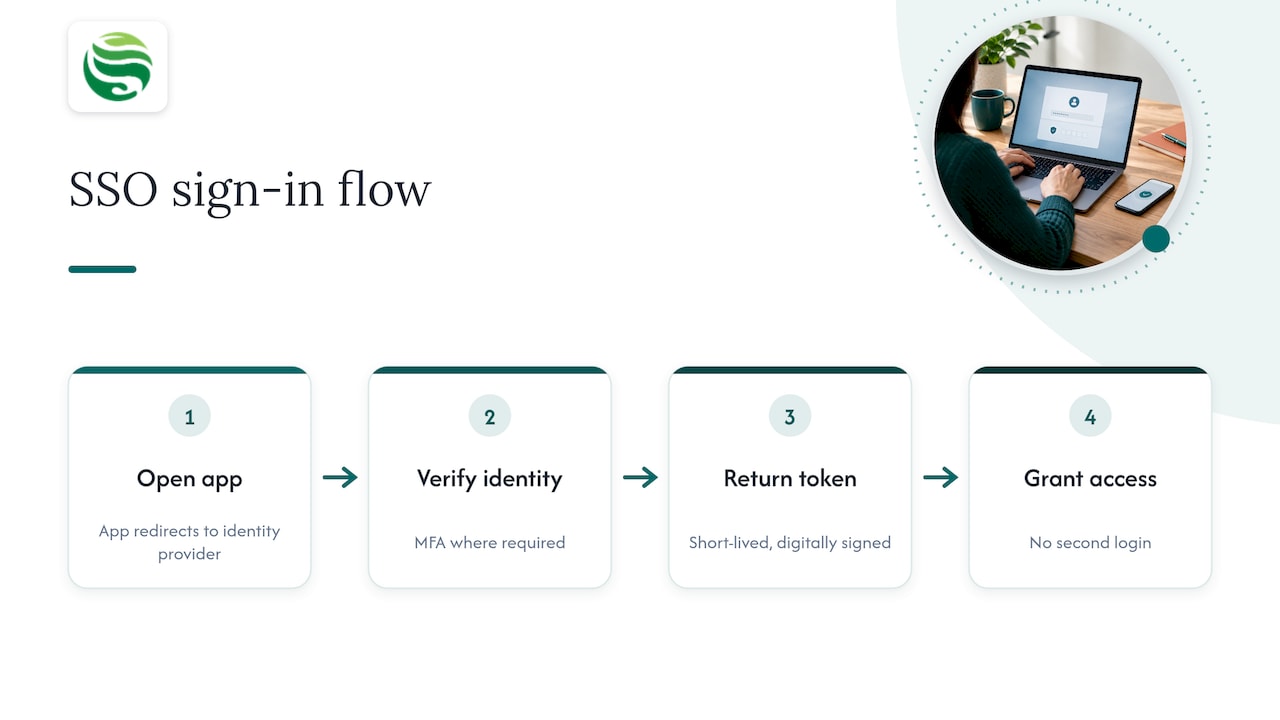
Without SSO, each employee holds a separate username and password for email, accounting, CRM and file storage. With SSO, a central identity provider (the system that holds staff accounts and confirms who is who) does the checking. An employee opens an application, which sends them to the identity provider. The provider verifies them, including a multi-factor challenge where required, and passes the application a short-lived, digitally signed token confirming their identity. The application then grants access without another login.
The common standards behind this are SAML and OpenID Connect, the latter built on OAuth 2.0. SSO is not a product you install on its own. It is a connection between the identity provider and each application, so every app needs to support a compatible standard.
If you already use Microsoft 365, you probably have an identity provider already. Our Microsoft 365 management service covers the cloud side of that setup.
Why the NCSC supports SSO
The UK National Cyber Security Centre (NCSC) recommends SSO to federate staff identities to a corporate directory. You get the benefits of robust authentication and monitoring in one place, and joiners, movers and leavers become easier to handle. Its 10 Steps guidance adds that SSO helps you revoke access when someone’s work account is closed, and that cutting the number of passwords people must remember discourages reuse and writing them down.
Those are the practical gains for a business of ten or fifty people:
- Fewer passwords to reuse or forget, and fewer reset requests to the help desk.
- Faster offboarding: disable one account and access to connected apps goes with it.
- One place to enforce rules, such as multi-factor authentication and sign-in policies.
Our guide to employee IT onboarding shows how that joiner and leaver routine fits together.
SSO and MFA: not a choice between the two
People often search for “SSO vs MFA” as if they compete. They answer different questions. SSO decides how many times you authenticate; MFA decides how strongly. MFA means a password plus a second proof, such as an authenticator app code. The NCSC tells organisations to turn on two-step verification for all user accounts where available and to let staff sign in to work services with options such as Sign in with Microsoft.
In practice, SSO puts everything behind one door, so that door needs the strongest lock. Use both. Our MFA rollout plan for Microsoft 365 sets out how to introduce it without disrupting staff.
Protecting the single point of failure
One login for everything is convenient for attackers too. The NCSC notes that federated authentication introduces a large single point of failure, and that if authentication fails, access to cloud services is affected. Its advice, which we build into how we set up identity:
- Favour OpenID Connect or SAML for connecting applications.
- Bind identities with a stable attribute, such as a staff ID, rather than something that changes.
- Verify the identity issuer and the integrity of the identity, and encrypt content, to prevent spoofing and tampering.
- Plan for incident response and disaster recovery of the identity provider itself.
- Keep a well-monitored emergency (break-glass) administrator account to restore access if the main route fails.
Emergency accounts still need strong sign-in. A Cyber Essentials requirements explainer states that a break-glass account using a password alone fails the control, and recommends a passkey (FIDO2) or certificate-based authentication. We cover this in Microsoft 365 MFA for UK admins using FIDO2.
Session tokens deserve attention too. Although SAML tokens are harder to steal than passwords, they are typically stored as browser cookies and can be targeted by cookie theft. Managed devices and endpoint monitoring reduce that exposure; see our endpoint protection service. For the wider technical safeguards when linking an identity provider to business software, this trust and security overview shows how one UK platform approaches it.
Is SSO worth it for your business?
It depends on your setup rather than your size. A US CISA study from May 2024 found adoption remains low among small and medium-sized businesses, citing cost, technical hurdles and lack of awareness and resources. In the UK, many platforms smaller firms already use include built-in SSO, and it is worth exploring if your team regularly switches between two or more tools.
SSO tends to pay back when:
- staff use several compatible business applications every day;
- people join, change roles or leave often, or manual offboarding is hard to track;
- someone is responsible for maintaining the identity platform.
Before you start, build an app-by-app checklist covering:
| Check | Why it matters |
|---|---|
| Supported protocol (SAML, OIDC) | Decides whether the app can connect at all |
| Subscription tier | Some vendors put SSO on a higher plan |
| Provisioning and deprovisioning | Determines how cleanly leavers are removed |
| Sign-out and active sessions | Shows whether access ends when the account is disabled |
| Recovery or fallback method | Keeps you working if the identity provider is down |
Use each vendor’s current documentation rather than assuming that protocol support guarantees compatibility. Also decide who configures applications, maintains certificates, handles sign-in failures and owns account recovery when the main administrator is away.
Getting SSO set up and kept secure
SSO is not a one-off project. Certificates expire, apps change, staff move on and the identity provider needs monitoring. Abersecure provides IT support and managed cyber security for businesses in Aberdeen and Aberdeenshire, with 24/7 endpoint monitoring, Microsoft 365 and cloud support, and Security by Default as standard practice. If you want one named owner for identity, our outsourced IT manager service gives you that without hiring in-house. For a one-off review, pay as you go IT support is available, and our packages show the wider options.
FAQ
Is single sign-on an integration?
In effect, yes. SSO works by connecting each application to an identity provider using a standard such as SAML or OpenID Connect. Okta’s documentation recommends OIDC for new app integrations. Each app you connect is a separate integration to configure and test.
What is the difference between SSO and MFA?
SSO reduces how often people log in; MFA strengthens each login with a second proof. They are complementary, and MFA should protect the SSO sign-in point.
Is single sign-on worth it for a small business?
It is when staff use several compatible applications and access changes often. With only a few apps, or none that support SSO, the benefit is smaller. Checking your applications against the table above shows quickly which side you fall on.
What happens if the identity provider goes down?
Access to connected services can be affected, which is why the NCSC advises disaster recovery planning and a monitored break-glass account. Our backup and disaster recovery service supports that planning.