
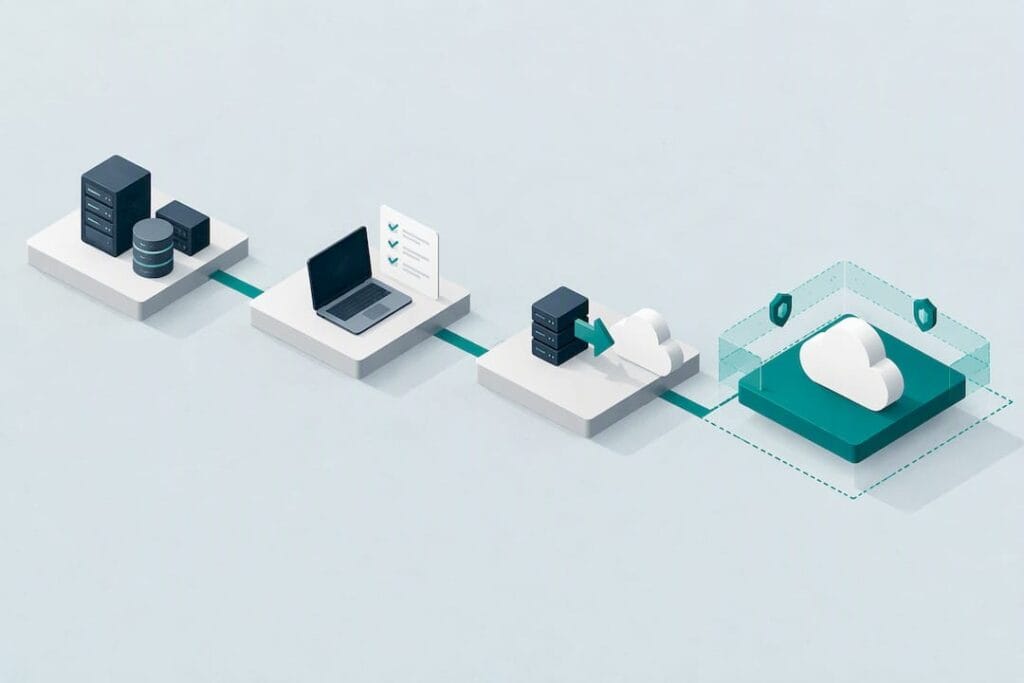
A successful cloud migration follows six stages: assess, choose, design, migrate, validate and optimise. Each stage carries its own checklist of decisions, from defining objectives and inventorying workloads to confirming security controls and testing cutover. Getting these stages right keeps downtime within agreed limits, preserves data integrity, controls cost, and satisfies compliance obligations. The sections below turn each stage into a practical cloud migration checklist you can apply directly.
Define objectives and build the business case
Before any technical work starts, translate your organisation’s reasons for moving, whether that is cost reduction, scalability or improved disaster recovery, into measurable objectives. Vague ambitions like “modernise IT” rarely survive contact with a project board; specific targets do.
Turn each business goal into a KPI with an acceptance threshold. If the driver is cost, state the percentage reduction you expect and by when. If it’s resilience, state the recovery time you’re aiming for. These numbers become the yardstick for every later decision, including which applications move first.
Not every workload deserves the same priority. Rank applications by business value, technical complexity and risk, then sequence the migration so that low-risk, high-value systems move early and build confidence before tackling anything mission-critical.
- Set measurable KPIs for cost, performance, scalability and resilience before technical planning begins.
- Score each application by business value, complexity and risk to decide migration order.
- Secure executive sponsorship and formal sign-off at each major planning milestone.
Executive sponsorship matters more than most project plans admit. A migration that stalls for budget or priority reasons halfway through often leaves systems split across two environments, which is harder to secure and more expensive to run than either option alone.
Inventory and discovery checklist
You cannot migrate what you haven’t mapped. Discovery is the stage most teams underestimate, and it’s also where unplanned costs and delays usually originate.
- Run automated discovery tools to catalogue servers, virtual machines, containers and middleware, then validate the output manually with application owners.
- Record every integration point, including scheduled jobs, API calls and file transfers that don’t show up in a simple server list.
- Capture software licences and support contracts tied to each asset, since some won’t transfer cleanly to a cloud environment.
- Log performance baselines, storage IOPS and network traffic patterns so you can size cloud resources accurately rather than guessing.
- Map data flows between systems, noting which ones touch personal or regulated data.
- Review the dependency map with each application owner and flag any integration that isn’t already documented.
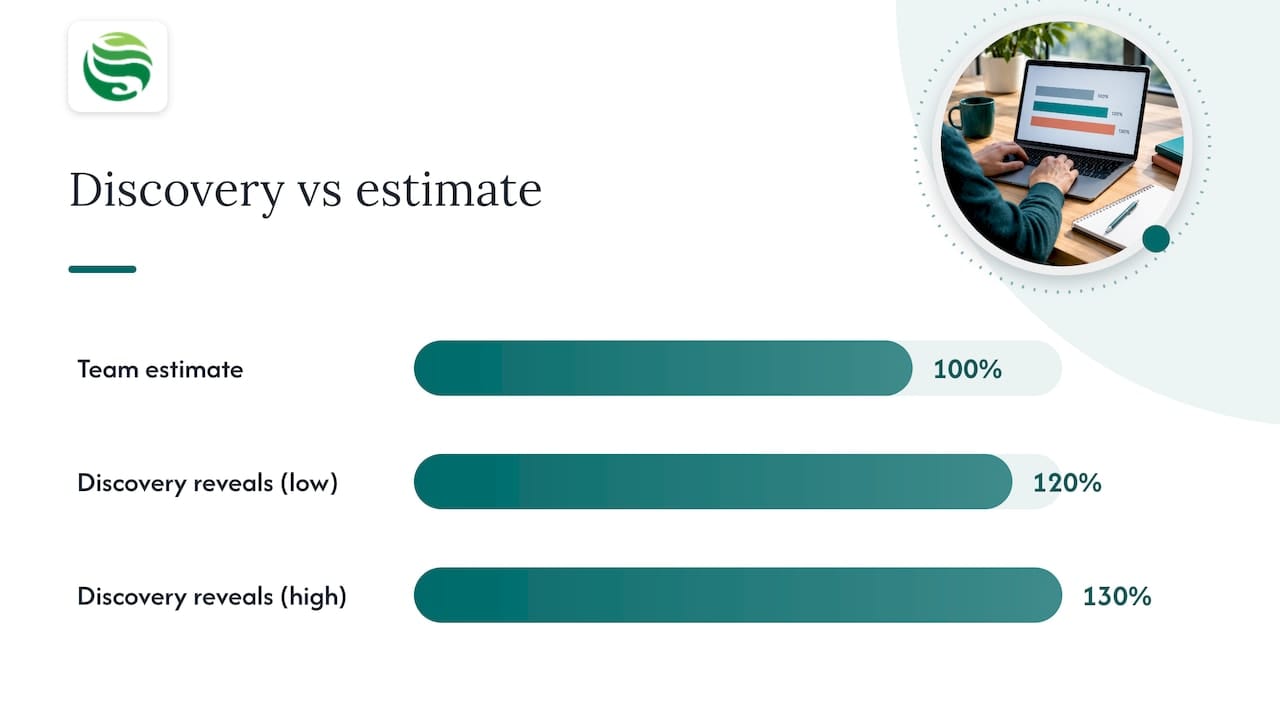
Thorough discovery typically reveals 20 to 30% more applications and dependencies than teams originally estimate, which is why discovery deserves real time rather than a rushed spreadsheet exercise. Skipping this step is the most common reason migration budgets and timelines slip later on.
Pro Tip: Interview application owners before you finalise the inventory; automated scanning tools miss scheduled batch jobs and manual integrations that only a human will remember.
Choose cloud provider and service model: selection checklist
Picking a provider is as much a contractual decision as a technical one. The NCSC’s guidance on choosing a cloud provider makes clear that certification evidence and its scope matter more than the simple existence of a certificate, so ask providers to show what a certification actually covers rather than taking the badge at face value.
- Request evidence of independent validation and ask how frequently certifications are re-audited, since a static, one-off certificate offers far less assurance than regular re-assessment.
- Check data residency, network architecture and service level agreements against your own compliance and performance requirements.
- Ask how the provider handles change control, incident response and communication during an outage.
- Clarify exit and portability terms before signing: how easily can you extract your data if you switch providers later?
- Favour cloud-native security features and infrastructure as code over simply recreating your existing on-premises security setup in a rented data centre.
For the service model itself, IaaS, PaaS or SaaS, decide per workload rather than as a blanket policy. Gartner’s widely used 7 Rs framework (rehost, replatform, refactor, repurchase, retire, retain, relocate) gives you a structured way to assign each application to the approach that balances effort, cost and benefit, rather than forcing every system through the same migration pattern.
Plan and design the target architecture and migration waves
With objectives set and workloads catalogued, design the environment they’ll land in. This is where landing zones, network segmentation and identity models get decided, and where mistakes are expensive to unpick later.
- Design landing zones with clear network segmentation so workloads of different sensitivity don’t share the same trust boundary by default.
- Define your identity and access control model, including how existing directory services will integrate with the cloud environment.
- Group applications into migration waves based on dependency, risk and business priority, rather than moving everything at once.
- Select a pilot wave, typically a small, representative slice of the portfolio, to surface issues before scaling up.
- Set rollback criteria for each wave in advance, so a struggling cutover has a predefined exit rather than an improvised one.
- Write runbooks for each wave covering pre-checks, cutover steps and post-migration validation, and assign a named owner to each one.
Waves that mix unrelated applications tend to create confusing troubleshooting during cutover, so group by shared dependency rather than by convenience.
Security and compliance checklist (NCSC and ICO aligned)
Security and compliance decisions belong inside the migration plan, not bolted on afterwards. The NCSC’s cloud security principles set out 14 areas to assess a cloud service against, covering data protection, identity, operational security and more, and checking a provider’s evidence against these principles before migration avoids discovering gaps once data is already in transit.
Automated guardrails matter over time, not just at launch. The NCSC recommends automating configuration checks and testing activity logs continuously, since manual review alone tends to miss drift as cloud platforms evolve and new features appear.
Data protection roles need equal clarity. Under UK GDPR, the controller determines the purposes and means of processing and remains accountable for compliance even when a cloud provider processes the data. Confirming which party is controller and which is processor, before migration, avoids disputes about responsibility later.
- Assess each candidate cloud service against the 14 NCSC cloud security principles rather than relying on marketing claims.
- Clarify controller and processor roles in writing and confirm contracts include documented processing instructions, confidentiality duties, security measures, sub-processor rules and audit rights.
- Enforce encryption in transit and at rest for all migrated data, with keys managed under your own access policy where possible.
- Set up centralised logging and monitoring before go-live, not as an afterthought once systems are already running.
- Build security testing into CI/CD pipelines so new deployments can’t bypass the guardrails you’ve set.
Contracts with processors should include minimum terms such as audit rights and sub-processor restrictions, and reviewing these clauses before signing is far cheaper than renegotiating after an incident. Organisations handling physical records alongside digital ones should also review GDPR and Data Protection Act 2018 obligations for secure disposal, since migration projects often surface old archives that need proper destruction rather than simple deletion.
Data migration strategy and verification checklist
Moving the data itself is where integrity risk concentrates, so the method you choose should match the workload’s tolerance for downtime and change.
- Choose a migration method, replication, bulk transfer or streaming sync, based on data volume, change rate and acceptable downtime.
- Define cutover rules in advance: which system is authoritative during the transition, and at what point does the cloud copy become the system of record?
- Run checksum verification on transferred data to confirm nothing was corrupted or dropped in transit.
- Reconcile record counts and key business totals between source and target before declaring the migration complete.
- Decide what happens to historical data that doesn’t need active migration: archive it, apply retention rules, or dispose of it securely rather than carrying it forward by default.
- Document the verification results so they can be referenced if a discrepancy surfaces weeks later.
Treat reconciliation as a formal sign-off step, not a quick glance at row counts, since silent data loss is far more damaging than a delayed go-live.
Governance, roles and operations readiness checklist
A migration without clear ownership tends to drift, with decisions made informally and no one accountable when something breaks. Defined governance and named roles prevent that.
- Set approval gates for each migration wave so a wave cannot proceed to cutover without formal sign-off from the relevant owners.
- Appoint a migration architect accountable for technical design decisions across all waves.
- Assign service owners for each application being migrated, responsible for validating that their system works correctly post-migration.
- Name a security lead who reviews each wave against the security checklist before it goes live.
- Appoint a change manager to run communication and approval processes, keeping stakeholders informed without slowing delivery.
- Prepare training materials and run knowledge transfer sessions so operations staff can support the new environment from day one.
Change control should apply to every wave, not just the first one. Teams often tighten governance early and relax it as the project progresses, which is exactly when late waves introduce the most risk.
Disaster recovery, backup and continuity checklist
Migration is also the moment to re-confirm your recovery requirements, since assumptions that held in your old environment don’t automatically carry over to the new one.
- Confirm recovery point objective (RPO) and recovery time objective (RTO) for each workload, and check the new environment can actually meet them.
- Review backup retention policies against your compliance obligations and business needs, adjusting for any gaps the migration has exposed.
- Test full restores, not just backup completion, before relying on the new environment in production.
- Validate that infrastructure as code can redeploy critical systems from scratch if needed, rather than assuming manual rebuild is an acceptable fallback.
- Document emergency access procedures for scenarios where normal authentication systems are unavailable.
- Check data portability and exit terms with your provider so a future move away from the platform doesn’t leave data stranded.
Restore testing deserves particular attention. A backup that has never been restored is an assumption, not a safeguard.
Cost optimisation and right-sizing checklist
Cloud costs rarely match the initial estimate unless you actively manage them, so build cost governance into the plan rather than treating it as a post-migration cleanup task.
- Estimate data transfer charges and licence costs for the target environment and include both in the original business case.
- Right-size compute and storage based on the performance baselines captured during discovery, rather than matching old on-premises specifications exactly.
- Identify idle or underused resources early and plan to decommission or downsize them post-migration.
- Consider reserved capacity for predictable, steady-state workloads once usage patterns are confirmed.
- Set up cost monitoring and consistent resource tagging from day one, so spend can be attributed to the right team or project.
Showback or chargeback models, where teams see the cost of the resources they consume, tend to keep spending disciplined long after the migration project itself has closed.
Test, validate and cutover checklist
Pilot testing is where theoretical plans meet real traffic, and it’s the point at which most remaining issues surface before they affect the whole organisation.
- Run a pilot migration with representative traffic and compare performance directly against your recorded baselines.
- Complete integration testing across every connected system, not just the one being migrated.
- Run user acceptance testing with live or near-live data so real workflows are validated, not just technical connectivity.
- Set documented go/no-go criteria for cutover, agreed by stakeholders in advance rather than decided under pressure on the day.
- Prepare a rollback procedure that can be executed quickly if the go/no-go criteria aren’t met.
- Run immediate post-cutover checks covering performance, data integrity and user access before declaring the wave complete.
Clear go/no-go criteria, agreed before cutover day, remove the ambiguity that otherwise turns a difficult decision into a rushed one.
Review, optimise and operate: post-migration checklist
Migration doesn’t end at cutover. The final checklist stage confirms the move actually delivered what the business case promised.
- Review performance, cost and compliance metrics against the KPIs set at the start of the project.
- Capture lessons learned from each wave and apply them to the next migration project, rather than losing that knowledge once the team disbands.
- Enable autoscaling where appropriate and confirm resource tagging and governance rules are enforced consistently.
- Hand over the environment to operations with complete runbooks, monitoring dashboards and documented escalation paths.
- Confirm training has been completed and operations staff can support the environment without relying on the original migration team.
A migration that meets its technical goals but leaves operations unprepared for day-to-day running hasn’t actually finished.
Abersecure’s role in supporting your cloud migration
Working through this checklist is demanding even for well-resourced IT teams, and many organisations choose to bring in specialist support for specific stages rather than managing every item alone. Our team has extensive experience in IT support and cyber security engagements, built around a Security by Default approach that treats protection as a built-in standard rather than a bolt-on extra.
- Our cloud infrastructure services align with the architecture and provider selection stages of a migration.
- Our backup and disaster recovery service supports the continuity checklist, including restore testing and recovery objective validation.
- Our cyber security services cover checklist items related to identity and access management, encryption and monitoring.
- We maintain case studies that document outcomes from past engagements across these service areas.
If you’re planning a migration and want a second opinion on readiness, a scoped review against this checklist is a practical starting point before committing to a full project plan.
Get migration support that keeps security built in from day one
A checklist gets you a long way, but working through every stage alongside endpoint monitoring, patch management and incident response already in place reduces the chance something slips between planning and go-live. We provide managed IT support that covers the operational side of a migration, from project oversight and vendor coordination to ongoing monitoring that keeps a newly migrated environment stable once the project team moves on.
For organisations concerned about continuity risk during and after a move to the cloud, our backup and disaster recovery service addresses the RPO, RTO and restore testing items on this checklist directly, with security built in as standard rather than added afterwards.
If you’d like to talk through where your organisation stands against this checklist, you can contact support through Abersecure to arrange a conversation about your migration plan.
FAQ
What are the 7 steps of a cloud migration model?
Common models describe discovery, planning, design, migration, testing, cutover and optimisation as sequential stages, though the exact labelling varies between frameworks. The AWS prescriptive guidance pattern groups these into planning, pre-discovery, discovery, build, test and cutover phases that apply to many rehosting projects.
What are the 7 R’s of cloud migration?
The 7 Rs are rehost, replatform, refactor, repurchase, retire, retain and relocate, each describing a different strategy for moving or handling an individual application. This framework is widely used to assign each workload to the approach that best balances migration effort against cloud benefit.
What are the key steps in a cloud migration testing checklist?
A testing checklist should cover pilot migrations with representative traffic, integration testing across connected systems, user acceptance testing with live data, and documented go or no-go criteria before cutover. Post-cutover checks on performance, data integrity and access should follow immediately after go-live, with a defined rollback procedure ready if issues appear.
How does UK GDPR affect a cloud migration plan?
Under UK GDPR, your organisation is typically the controller even when a cloud provider processes your data as a processor, and you remain accountable for compliance throughout. Contracts with providers should include documented processing instructions, security measures and audit rights before any data moves.
How do I choose between IaaS, PaaS and SaaS for a migration?
The choice depends on the workload: IaaS suits applications needing full infrastructure control, PaaS suits teams wanting to offload platform management, and SaaS suits standard business functions like email or collaboration tools. Mapping each application through the 7 Rs framework helps decide which service model, and which migration strategy, fits it best.