
The 3-2-1 backup rule means keeping at least three copies of your important data, on two different types of storage, with at least one copy held off-site. The live data counts as the first copy, so in practice you need two backups beyond it. The aim is simple: no single incident, whether a failed server, a deleted folder, a fire or a cyber attack, should be able to remove every copy you could recover from.
That is the short answer. The rest of this guide covers how the 3-2-1 backup rule works in a real business, where cloud storage fits, why UK guidance now says the rule alone is not enough, and how often to back up and test.
What the 3-2-1 backup rule means
Each number does a specific job.
- 3 copies of your data. One primary copy (the data your business uses every day) and two backups. The DfE Cyber Security Hub defines it this way, and TechTarget’s explanation confirms that the original production data counts as one of the three.
- 2 different forms of storage. The copies should not all sit on the same kind of device or system. Examples include on-premises storage and cloud storage. If one technology fails or is compromised, the other is unlikely to fail in the same way.
- 1 copy off-site. At least one backup lives away from your premises. It may be replicated electronically or physically transported, according to TechTarget.
The UK National Cyber Security Centre (NCSC) describes the pattern as a resilience measure: a localised incident affecting one copy should not affect all of them. US guidance from CISA gives the same definition and recommends combining on-site and remote backups.
How the 3-2-1 backup rule works in practice
The rule protects against more than most owners expect. The DfE Cyber Security Hub lists cyber attacks, accidental deletion, hardware failure, cloud-service outages and local disasters such as fire or flood.
Here is how it might look for a ten-person Aberdeen office running a file server and Microsoft 365. This is an illustration of the pattern, not a description of any particular client set-up.
| Copy | Where it lives | Purpose |
|---|---|---|
| 1. Live data | File server and Microsoft 365 | Day-to-day work |
| 2. First backup | Local backup appliance or NAS on a separate system | Fast restores of single files or a full server |
| 3. Second backup | Cloud backup service, separate credentials | Off-site recovery if the office is unavailable or the local backup is damaged |
TechTarget suggests a sensible recovery order: restore from the local backup first, use the off-site copy if the local one is unavailable or unusable, and restart the backup process as soon as operations return. Local restores are quicker, and the off-site copy is your safety net.
Start with the data that matters
You do not have to back up everything with equal priority. CISA recommends identifying business-critical data first: customer records, HR information, financial and payroll data, email, configuration files, websites and operational databases. Many small firms find this easier once their records sit in fewer places, and centralising business data records makes it clearer what needs protecting and how to confirm a restore is complete.
Be careful with Microsoft 365. Having your email and documents in the cloud does not by itself give you an independent backup. Our guide to Microsoft 365 backup gaps explains what to check.
Can cloud storage count towards the 3-2-1 backup rule?
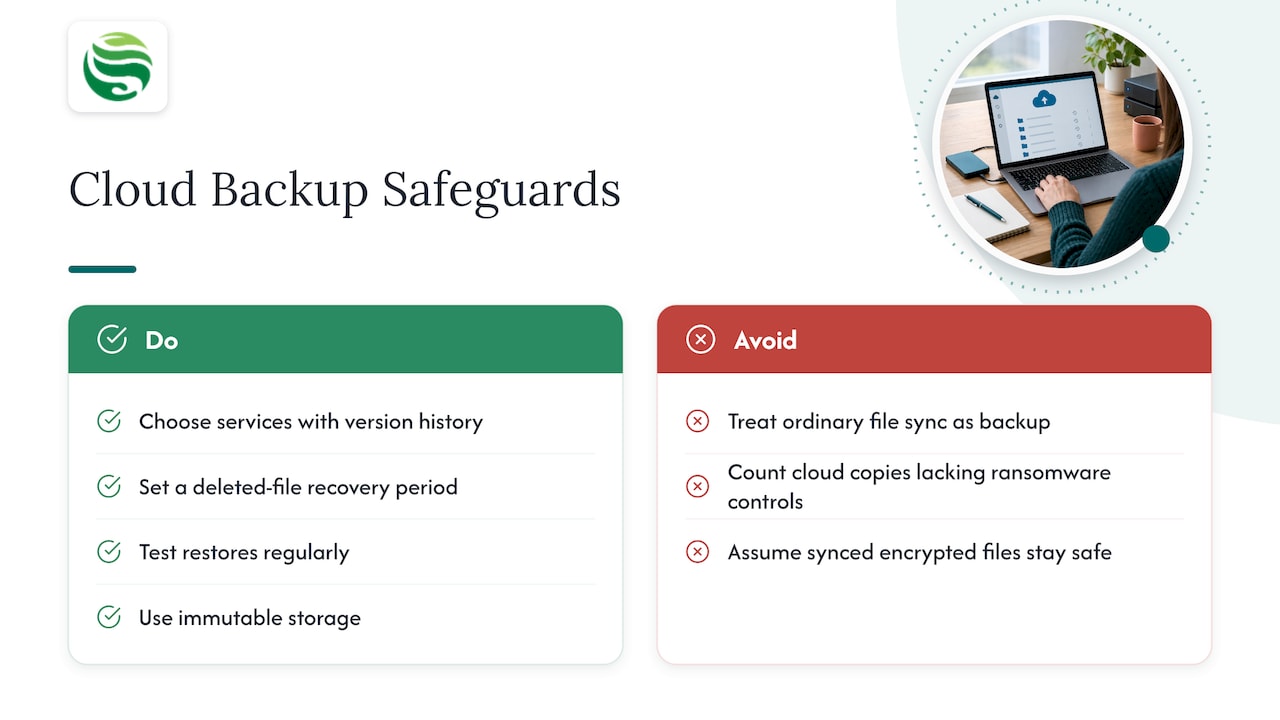
Yes, with a condition. The DfE Cyber Security Hub confirms cloud storage can be both one of your two storage types and your off-site copy. It recommends choosing services with version history, recovery of deleted files for a defined period, regular restore tests and immutable storage.
The condition is that cloud sync is not the same as cloud backup. The Cyber Essentials Knowledge Hub warns that ordinary file-sync services can synchronise ransomware-encrypted files, so the cloud copy gets damaged along with the original. It says cloud storage counts as the off-site copy only if its versioning and recovery controls protect against ransomware.
A quick test: if you delete or encrypt a file on your laptop, does the cloud copy change too? If so, it is a mirror, not a backup.
Why the 3-2-1 backup rule is no longer enough on its own
The rule is still a sound foundation, but it was written before ransomware crews made backup systems a priority target. The NCSC points out that the traditional rule does not require any backup location to be offline. An attacker who gets into your network may be able to reach every connected copy.
The NCSC’s ransomware-resistant backups guidance goes further: on-premises and cloud backups are not ransomware-resistant by default, because attackers commonly try to delete or destroy recovery data. Its advice is to consider a breadth of technologies (cloud-based, on-premises and self-managed) rather than trusting one, and to treat resilience as a matter of controlling access and resisting destruction, not just counting copies.
This is why you will see variations such as 3-2-1-1-0 discussed. What matters is the protection they point towards. The DfE Cyber Security Hub sets out practical measures:
- Disconnect at least one backup from your network.
- Digitally disconnect cloud backups when they are not in use.
- Use separate credentials for cloud backups, not your everyday admin accounts.
- Restrict which authorised devices can modify backups.
Separate credentials matter more than they sound. If an attacker steals one administrator password and it also opens your backups, your two “extra” copies are not really independent. Our SME password policy guide covers the basics, and our ransomware response plan shows where backups fit when an incident is under way.
How often to back up, and how to test a restore
The Cyber Essentials Knowledge Hub treats daily backups as good practice and weekly as a recommended minimum. Ask a practical question: how much work can your business afford to redo? If losing a week of invoices, orders or project files would hurt, weekly is too thin. The DfE Cyber Security Hub advises agreed schedules, automation where possible and frequent testing.
A green tick on a backup report does not prove recovery works. The Cyber Essentials Knowledge Hub recommends testing at least monthly. A useful routine:
- Restore a single file from the local backup and from the off-site copy, and confirm it opens.
- Restore a full system or data set to a test location, as CISA advises testing both complete and partial restores.
- Check how far back you can go. CISA recommends confirming data can be rolled back at least seven days.
- Write the procedure down so someone other than your usual IT contact can follow it. CISA recommends documenting it so staff can recover systems, networks and data.
- Restart backups straight away once recovery is complete.
TechTarget’s view is that the rule is a recovery process, not a storage diagram: readable media, current copies and realistic restore tests are what make it work. If a regulator or insurer later asks how quickly you recovered, our disaster recovery planning guide explains what UK IT leaders should have ready.
Putting the 3-2-1 backup rule in place with Abersecure
A backup that nobody monitors or tests is a risk, not a safeguard. At Abersecure we provide IT support and managed cyber security for businesses in Aberdeen and Aberdeenshire, with Security by Default as a standard practice, and backup and disaster recovery is part of what we offer. If you want your 3-2-1 set-up reviewed, built or tested, see our Backup and Disaster Recovery service, or look at our managed IT support if you would rather have one team own it day to day.
FAQ
Is the 3-2-1 backup rule outdated?
No, but it is incomplete on its own. The NCSC notes the traditional rule does not require an offline copy, so you should add protections such as an offline or disconnected backup, separate credentials and regular restore tests. Treat 3-2-1 as the minimum structure, not the finish line.
Does the original data count as one of the three copies?
Yes. The three copies are your live production data plus two backups. If you only have the live data and one backup, you have two copies, not three.
What counts as two different types of storage?
Different forms of storage on at least two separate devices, according to the DfE Cyber Security Hub. A common pairing is on-premises storage and cloud storage. Two partitions on the same disk, or two folders on the same server, do not meet the intent.
How often should I test my backups?
The Cyber Essentials Knowledge Hub recommends at least monthly. Test a single-file restore and a larger restore, because a successful backup report does not prove you can recover.
Is a cloud sync service enough for the off-site copy?
Not by itself. Sync services can copy ransomware-encrypted files across, so you need versioning, deleted-file recovery and ideally immutable storage before the cloud copy counts as a dependable backup.