
A sound data backup strategy for a UK business rests on four decisions: what you protect first, how many copies you hold and where, how long you keep them, and how often you prove they restore. The national guidance is consistent: follow the 3-2-1 rule, keep at least one copy offsite and one offline, and test restores before you need them. Getting those four right is easier with a managed partner. Our Backup and Disaster Recovery service takes the routine work off your team, and this guide shows what the work involves.
Start with what the business cannot operate without
The NCSC’s small organisations guide says to back up everything you need to run the business: your website, emails, invoicing, documents, presentations, contacts and customer information.
Not everything carries equal weight. One small-business backup guide suggests ranking data by three questions:
- What is the financial or legal exposure if it is lost? Tax, payroll and regulator-linked records sit at the top.
- What happens to customers if it is unavailable?
- How quickly could it be recreated? Most owners skip this one.
The same guide orders priorities as financial and accounting data, customer records, email, working files, then line-of-business applications. Financial and customer records should be restorable within hours; core files and email within a day or so; easily recreated data can wait a few days.
A worked example: a ten-person Aberdeen firm might list its accounts package and client database as tier one, shared drives and Microsoft 365 mailboxes as tier two, and staff laptops as tier three, since a laptop can be rebuilt from a standard image.
Follow the 3-2-1 rule
The DfE Cyber Security Hub defines the rule as three copies of your data, on two different forms of storage on separate devices, with one copy offsite, such as a separate location or the cloud. The NCSC’s 10 Steps guidance names it as a key defence against ransomware.
In practice that looks like this:
- Copy one: your live data on servers, laptops and cloud applications.
- Copy two: a local backup on a storage device or appliance in your office.
- Copy three: an offsite copy in a separate location or a cloud backup service.
For a fuller walkthrough, see our guide to the 3-2-1 backup rule.
What offsite backup means and why it matters
Offsite simply means a copy that does not share a building, or a failure, with your main systems. Fire, flood, theft or a compromised office network cannot reach it. Cloud backup is the usual route for small firms, and an external drive stored at another location also qualifies.
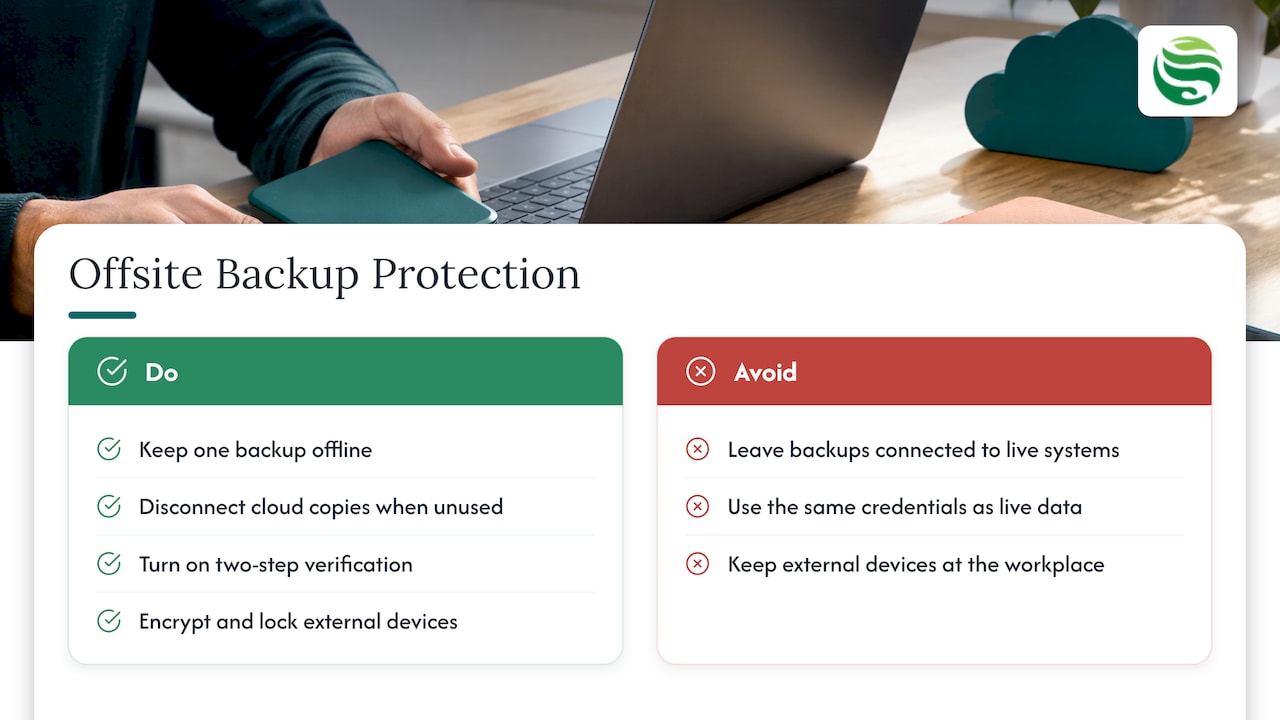
Offsite does not automatically mean safe from ransomware. The NCSC’s guidance on offline backups says to keep at least one backup offline at all times, connected to live systems only when absolutely necessary. A cloud copy counts as offline only if it is digitally disconnected when not in use. The ICO adds that you should check backups are not connected to the live data source, so malicious activity cannot reach them, and that external devices should be kept away from the main workplace, encrypted and locked away where possible.
This separation principle, keeping a copy that live systems cannot touch, is the same logic behind limiting what payment systems can reach: isolation is what protects the copy you will rely on.
Two further protections from the NCSC: hold one online backup and one on a storage device, in case one is lost, stolen or fails, and turn on two-step verification on online backups. If your backups sit in the same Microsoft 365 tenant, under the same credentials as your live data, one compromised login can reach both. Our note on Microsoft 365 backup gaps covers this in detail.
Set frequency, retention and recovery targets
Two terms drive these choices. The recovery point objective (RPO) is how much data you can afford to lose, measured as the time between your last backup and the incident. The recovery time objective (RTO) is how long restoration may take. The New Zealand NCSC explains both, noting that a common RPO default is 24 hours, shorter for high-value data, and that RTO decides where backups are stored and on what media.
Apply them by tier:
| Data tier | Example | Sensible target |
|---|---|---|
| Tier one | Accounts, customer database | Backed up several times a day or continuously; restored within hours |
| Tier two | File shares, email | Daily backup; restored same or next day |
| Tier three | Laptops, rebuildable systems | Weekly or image-based; restored within days |
The tiers follow the restoration windows in the priority guide above; the backup frequencies are our suggestion for matching them.
On retention, the NCSC advises keeping backups for at least a month rather than one rolling copy. If an infection goes unnoticed for a fortnight, a single overwritten backup holds only infected data.
Test restores and plan the recovery
A backup you have never restored is an assumption. The NCSC says to test backups regularly, know how to restore before an incident, and keep access to backups even in a complete system failure. When restoring after an attack, reinstall executables from trusted sources and scan restored files with up-to-date antivirus to avoid reinfection.
For a schedule, the New Zealand NCSC recommends single-file restores at least quarterly and a full restoration at least annually. Our backup testing schedule lists what to check each time. Write the recovery order down, tier one first, and connect it to a wider business continuity plan and a ransomware response plan.
Choosing where your backups live
The ICO’s cloud computing guidance gives a practical checklist for any provider:
- Ask which countries your data is likely to be processed in, and what safeguards apply, including sub-processors.
- Confirm encryption in transit, and consider encryption at rest with the key held by you.
- Ask how quickly the provider can restore your data after major loss.
Before adopting a new cloud system, the ICO’s UK GDPR guidance says you must carry out a DPIA screening assessment to see whether a full data protection impact assessment is needed. The ICO supplies a template and checklist.
How Abersecure handles backup
Backup and Disaster Recovery is one of our listed services, alongside Managed Detection & Response and Microsoft 365 Management. If you want your data backup strategy designed, monitored and kept current without a full-time IT hire, see the Backup and Disaster Recovery service, or explore our packages. We provide Security by Default as standard across our support packages, so security is part of the arrangement from the start.
FAQ
How many backups does a small business need?
The 3-2-1 rule asks for three copies on two types of storage, with one offsite. The NCSC also advises keeping at least one backup offline, so most small firms end up with a local copy and a disconnected or isolated cloud copy.
Is cloud backup enough on its own?
It can be, provided it follows the principles above: it sits outside your live environment, is protected with two-step verification and is disconnected or isolated when not in use. A second copy on a separate device gives you a fallback if one fails.
How long should I keep backups?
The NCSC advises at least a month, matched to how long it might take you to detect an infection. Keep longer for records you are legally required to retain.
How often should I test a restore?
Guidance from the New Zealand NCSC suggests single files at least quarterly and a full restoration at least annually. Test sooner after any major system change.