A device management policy is a short, written standard that says which devices may access your business data, how they must be configured, and what happens when one is lost, stolen or retired. To be useful it must be enforced by tooling, not just filed on a shared drive. This guide sets out what a policy for a UK small or medium-sized business should contain, which official guidance to anchor it to, and how to roll it out without disrupting your team.
What a device management policy needs to cover
The NCSC’s Cyber Essentials requirements are a sensible backbone. The current Cyber Essentials requirements v3.3 are organised under five technical controls: firewalls, secure configuration, security update management, user access control and malware protection. A policy that maps to those five headings is easy to explain to staff and easy to evidence to a customer or insurer.
In practice, your device management policy should state:
- Scope. Which device types are covered: laptops, desktops, phones, tablets, and any personal devices that reach company email, Teams or file storage.
- Ownership and registration. Every device that accesses organisational data is registered and managed. Cyber Essentials expects you to keep an inventory of devices, so the policy should name who maintains it.
- Baseline configuration. Passcode or biometric sign-in, disk encryption, a minimum operating system version, and a list of approved apps.
- Update rules. How quickly operating system and application updates must be applied, and who is accountable when a device falls behind.
- Loss and theft. Who staff report to, how fast, and how access is revoked and corporate data wiped remotely.
- Leavers and retirement. How devices are recovered, wiped and recorded when someone leaves or hardware reaches end of life.
Keep it to two or three pages. Staff will read a short policy; they will not read a long one. If you want to see the full lifecycle behind points 2 to 6, our guide to the five stages of device lifecycle management covers it in more detail.
Which devices fall in scope
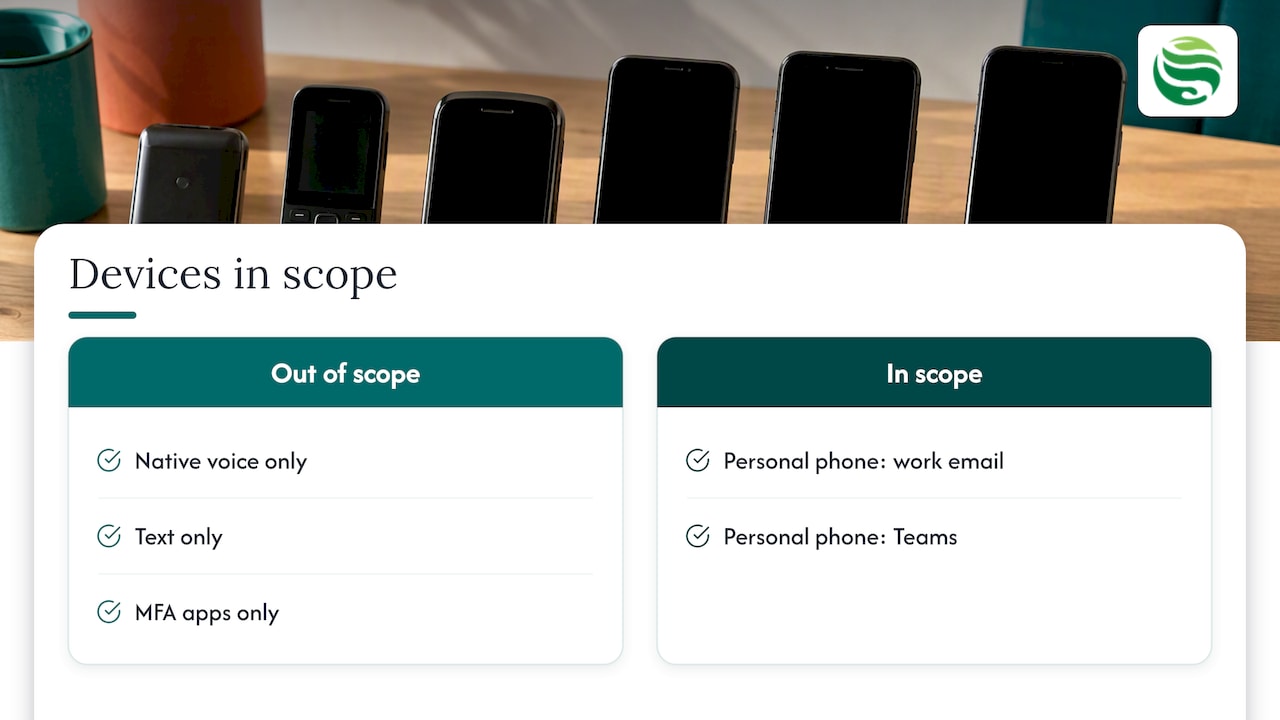
Scope is where most policies go wrong. Under Cyber Essentials, devices used only for native voice, text or multi-factor authentication apps are out of scope, as noted in the v3.3 requirements. A personal phone that opens work email or Teams is a different matter: it touches company data, so your policy should treat it as in scope.
Decide early whether you allow personal devices at all. The NCSC’s BYOD guidance walks through whether BYOD suits you, which deployment method fits, and what else you need alongside it. Many SMEs choose a split: company-owned laptops, with personal phones allowed only through managed work apps.
The baseline settings to enforce
This is the part readers often search for as a Windows or endpoint hardening checklist. You do not need a 200-line benchmark to start. A defensible baseline for a business device is:
- Full-disk encryption switched on and verified.
- Screen lock after a short idle period, with a passcode or biometric.
- Supported operating system only, with a minimum version enforced.
- Automatic security updates configured, not assumed.
- Anti-malware active and reporting.
- Standard user accounts for daily work, with administrator rights limited and logged.
- A remote lock and wipe capability for corporate data.
- Approved app catalogue, with unmanaged installs restricted where practical.
One point catches out many businesses. According to The Business Hub’s UK SME guide, mobile device management (MDM) platforms do not patch devices by default: the platform gives you visibility, but updates only happen if an administrator has configured the OS update policy. Writing “devices must be kept up to date” in the policy achieves nothing until a matching setting exists in your tooling.
Passwords belong in the same baseline. Our SME password policy is aligned to NCSC, Cyber Essentials and ICO guidance and can sit alongside your device standard.
Personal devices, privacy and the ICO
If staff use their own phones or laptops, your policy has to respect their privacy as well as protect your data. The ICO’s bring your own device guidance makes clear that BYOD raises data protection concerns because the user owns the device, while you remain the data controller.
Three practical consequences follow:
- Tell staff exactly what you can see. Say what is monitored, why, and when. Monitoring should serve a specific business purpose, not general surveillance of personal lives.
- Assess before you monitor. Before introducing monitoring technology on personal devices, carry out a data protection impact assessment, as the ICO guidance indicates.
- Separate work from personal. Managed work apps and containers let you wipe company data without touching family photos.
A plain-English summary of what an MDM can and cannot see, such as the one on Serverman’s small business guide, helps reassure sceptical staff. For a deeper look at the official position, read our article on mobile device management and the NCSC and ICO guidance.
Lost and stolen devices: the revocation test
An MDM does not remove your duties as a data controller. The ICO’s guidance points to the need for a clear, documented process for cutting off access when a device is reported lost or stolen. A device is only as secure as that process is understood and acted on.
Test it. Ask a colleague to report a pretend loss at 6pm on a Friday and time how long it takes to disable sign-in, revoke tokens and trigger a wipe. If the answer depends on one person who is on holiday, the policy has a gap. This is also where out-of-hours cover matters: devices are lost on weekends and during travel, not just between nine and five.
Rolling the policy out in 4 to 6 weeks
The Business Hub suggests that a typical SME MDM rollout takes four to six weeks, and that tools such as Intune are usually enough at this scale. Its suggested sequence is a sound template:
- Week 1: inventory. List every device that touches company email, Teams or files, including the ones nobody remembers approving.
- Week 2: choose the platform and set baselines. Passcode, encryption, minimum OS version, app catalogue.
- Week 3: pilot. Enrol 5 to 10 users, test enrolment, policy enforcement and app delivery.
- Weeks 4 to 6: phased deployment. Roll out by team, fix what the pilot exposed, then review compliance reports.
For new Windows laptops, zero-touch provisioning removes much of the manual work; see our guide to Windows Autopilot deployment. If your team mixes Windows and Apple hardware, Intune and Jamf together is a pairing worth understanding before you choose.
After go-live, review the policy at least once a year and whenever your tooling or certification requirements change. Pair that with a wider IT risk assessment so the policy reflects what you actually need to protect.
Making the policy stick with managed support
A policy lives or dies on day-to-day enforcement: checking compliance reports, chasing devices that are out of date, handling lost-device reports. Many Aberdeen and Aberdeenshire businesses do not have an in-house team to do that.
That is the gap we fill. Our endpoint management service covers device and endpoint oversight as part of our wider managed IT support, with Security by Default as our standard practice rather than an optional extra. If you would rather start with a single piece of work, pay as you go IT support is available too. Speak to us through the Abersecure website and we will talk through what your policy needs.
Device management policy FAQs
Is a device management policy a legal requirement?
No single UK law demands a document with that title. However, as a data controller you must protect personal data, and the ICO expects clear processes around devices, particularly personal ones. Cyber Essentials certification also requires you to control the devices in scope.
What is the difference between a device management policy and a device compliance policy?
The management policy is the written standard: scope, responsibilities and rules. A compliance policy is the technical setting in your MDM that checks whether a device meets those rules, for example encryption on and OS version current. You need both, and the second should mirror the first.
Do personal phones need to be covered?
If a personal phone accesses work email, Teams or files, treat it as in scope. Phones used only for calls, texts or multi-factor authentication apps are out of scope for Cyber Essentials. Whichever route you choose, state it in the policy.
How long does it take to implement?
For most SMEs, four to six weeks from inventory to full deployment is realistic, including a pilot group of 5 to 10 users. Larger or mixed-platform estates may take longer.
Does an MDM keep devices patched automatically?
Not by default. The update policy has to be enabled and configured by an administrator before the platform will push updates.