A good IT support SLA states what is covered, how fast the provider responds and resolves at each priority level, when support is available, and what happens if targets are missed. The IT SLA examples below show how those pieces look in practice, so you can judge any agreement put in front of you.
The figures here are illustrations drawn from published sources. They are not Abersecure’s terms. Your own targets should reflect how your business actually works.
What an IT support SLA is
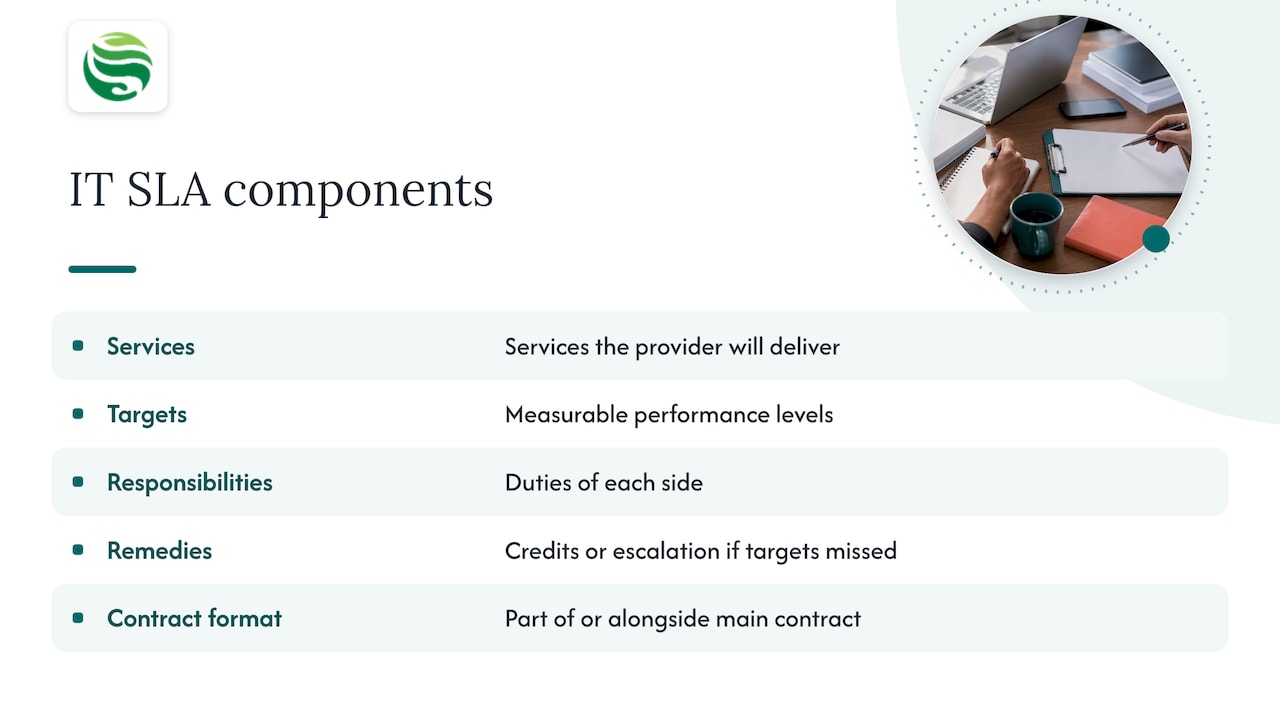
An IT support service level agreement is a documented agreement between a provider and its customer. According to Harper James, it defines the services, measurable targets, each side’s responsibilities and the consequences if targets are missed. It commonly forms part of the main services contract or sits alongside it.
The common components are uptime or availability, response time, resolution time, roles and responsibilities, quality metrics and remedies such as service credits or escalation. ManageEngine’s UK guide adds that a sound SLA sets priority-based response and resolution times, escalation conditions and actions.
If you are still choosing a provider, our guide on how to choose IT support for your business puts the SLA in the context of the wider decision.
IT SLA examples for response and resolution times
Priority levels are the heart of most IT support SLAs. A server outage that stops everyone working and a request to change a mailbox name should not share a deadline.
A published example comes from CSCS, which sets incident response and resolution targets in working hours and days:
| Priority | Response target | Resolution target |
|---|---|---|
| Critical | 1 working hour | 2 working hours |
| High | 2 working hours | 8 working hours |
| Medium | 8 working hours | 72 working hours |
| Low | 8 working hours | 14 days |
Three lessons come from this layout:
- Targets step down with urgency. The critical tier is measured in hours, the low tier in days.
- The clock is stated. Working hours and calendar days are different measures, so the SLA must say which applies.
- Each priority needs a definition. A table of times is only useful if both sides agree what counts as critical. A typical definition ties it to business impact, such as a whole site or a core system being unavailable. Write your own definitions into the agreement.
Treat any table as a starting point. A firm that trades online around the clock needs tighter critical targets than an office that works nine to five.
Response time versus resolution time
The two terms are often confused, and the difference matters when you read an SLA.
The Service Desk Institute’s sample agreement describes a response as a callback or email acknowledging the request or discussing progress, not necessarily a fix. The same template defines resolution as agreement between customer and support team that the request can be closed.
So a 30-minute response target tells you when someone will pick up your problem. It says nothing about when the problem will be solved. Check that the agreement has both, for every priority level, and that it says how each is measured: from the moment you log the ticket, from when it is triaged, or from when a technician is assigned.
The same template also notes that a target measures performance rather than guaranteeing it. Ask the provider to state in the contract whether each item is a target or a firm commitment.
Support hours, out-of-hours cover and escalation
Many disputes come from assumptions about when support is available. A clear SLA specifies support hours and contact methods, says whether cover is 24/7 and explains how out-of-hours requests are handled. It also sets response times by problem category and the escalation route for urgent issues or those needing specialist support.
The Service Desk Institute’s default targets, for example, apply during normal working hours of 09:00 to 17:00. If your staff work shifts, run a shop at weekends or support clients overseas, that default will not fit.
When you review the hours section, ask:
- Which hours are covered by the standard targets?
- What happens outside them: is there a separate out-of-hours service, and does it use the same priority levels?
- Who do you call for a critical incident, and what is the next step if nobody responds?
- At what point does a ticket go to a senior or specialist engineer?
For more on this, read what UK businesses should know about out-of-hours IT support. If your risk is a critical failure outside office hours, look at how emergency IT support is structured and how it links to the main agreement.
Availability targets, exclusions and remedies
Availability
Uptime figures look precise but can mislead. Harper James points out that a figure such as 99.9% is unclear unless measurement and compensation are defined. The SLA should state where availability is measured, over what period, and which maintenance windows are excluded.
The arithmetic helps you judge what a figure allows. A 99.9% target across a year permits roughly 8.8 hours of downtime. Across a 30-day month it permits about 43 minutes. Ask yourself whether your business could live with that, and whether the figure applies to a single service or the whole environment.
Exclusions
The agreement should say what is included and what is not. Gannons notes that exclusions may cover issues caused by the customer or by third parties. That is reasonable, but read it closely. If your line-of-business software supplier or broadband carrier is involved, find out how the provider handles that coordination and whether the clock keeps running.
Remedies
The SLA should explain what happens when targets are missed, including how service credits are calculated, when they apply and whether they are the exclusive remedy. The main agreement may also give termination rights for repeated or serious failures. Service credits rarely compensate for lost trading, so the termination right is often the more useful protection.
SLA versus OLA
An SLA is the commitment made to the customer. An OLA, or operational level agreement, is internal. ManageEngine describes it as the agreement that allocates work and internal deadlines between delivery teams so the SLA can be met. Its example is an onboarding target of one day to respond and four days to fulfil, with hardware, software and network teams each owning part of the work and delays escalating to the technician’s supervisor.
Another source frames it the same way: an OLA is an agreement between the provider and another part of the same organisation. As a customer you do not normally sign an OLA. What matters is that the provider has organised its own teams so the promises in your SLA are realistic.
What to check before you sign
Clarity is the central principle. Harper James says targets, measurement, responsibilities and remedies must be definite enough to avoid disputes. Use this checklist:
- Scope. Are the covered services, devices and users listed?
- Priorities. Are the levels defined by business impact, with both response and resolution targets?
- Clock. Is it clear when timing starts, stops and pauses?
- Hours. Are support hours, out-of-hours arrangements and contact methods written down?
- Escalation. Is there a named route for unresolved or specialist issues?
- Reporting. Will you receive regular figures against each target?
- Remedies. Are credits, exclusivity and termination rights explained?
- Data protection. If the provider handles personal data for you, the agreement should address UK GDPR and the Data Protection Act 2018, including documented instructions, security measures, subprocessors and breach reporting.
If your SLA sits inside a larger contract, it helps to understand how framework agreements in procurement structure terms, because the same logic of clear scope and measurable obligations applies.
How Abersecure approaches IT support
We provide business IT support and managed cyber security for small and medium-sized organisations in Aberdeen and Aberdeenshire, with Security by Default as a standard practice. Our managed IT support covers day-to-day technical support, and our IT help desk is where most requests start. Support options include recurring managed contracts, pay-as-you-go hours and packages at different levels.
If you want to discuss what service levels would suit your business, get in touch and we will talk through the options.
Frequently asked questions
What should an IT support SLA include?
It should list the covered services, response and resolution targets by priority, support hours, escalation steps, each side’s responsibilities, exclusions and remedies. Availability targets and maintenance windows belong there too if uptime matters to you.
What is a good response time in an IT support SLA?
There is no single right answer, because it depends on priority and hours. A published example uses one working hour for critical incidents and eight working hours for medium and low ones. Match the targets to the cost to your business of waiting.
Is an SLA legally binding?
Often it forms part of, or sits alongside, the main services contract, so its terms can carry contractual weight. How far depends on the drafting, including whether items are targets or commitments. For a specific agreement, ask a solicitor to review it.
What is the difference between an SLA and an OLA?
An SLA is the agreement between a provider and its customer. An OLA is an internal agreement between the provider’s own teams that sets the internal deadlines needed to meet that SLA.