

Effective ransomware protection for SMEs comes down to layers that run every day, not a single product: tested offline backups, multi-factor authentication, prompt patching, restricted privileges, trained staff and a rehearsed response plan. The NCSC’s guidance on mitigating ransomware recommends exactly this defence-in-depth approach. At Abersecure, we build these layers into managed IT support for Aberdeen and Aberdeenshire businesses under our Security by Default standard, so protection is not left to whoever has time.
Why smaller businesses are in the frame
Many owners assume attackers only want big names. The NCSC’s small organisations guide says there are 5.5 million small organisations in the UK with up to 49 employees, and that 1 in 2 small businesses suffer a cyber incident every year.
The cost goes beyond a ransom. The government’s research on ransomware victims found that direct and indirect costs could be severe, that some organisations paid significant sums for outside technical, legal or PR support, and that victims were rarely clear beforehand on the key steps to reduce the risk.
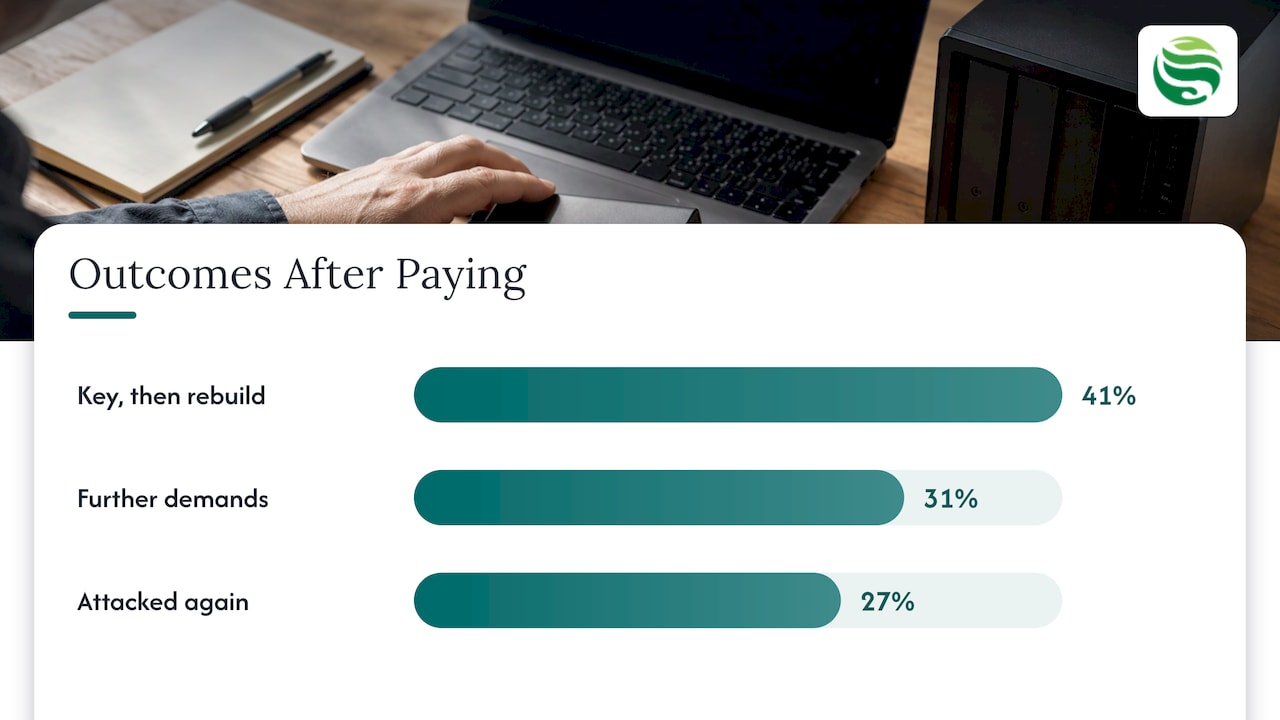
Paying does not guarantee a clean recovery either. In the Hiscox Cyber Readiness Report 2025, among firms that paid, 41% received a recovery key but still had to rebuild systems, 31% faced further demands and 27% were attacked again.
Attacks also tend to land when nobody is watching. Marsh notes that they frequently happen overnight or at weekends, when the network is monitored less. That is why out-of-hours cover belongs in any ransomware defence strategy.
The defence layers that matter most
The NCSC’s list is practical and short. Here is what each layer means for a small firm.
- Tested, offline backups. Covered in the next section, because they decide whether you recover.
- Filtering malicious content. Email and web filtering stop many attacks before anyone clicks. Phishing is the usual route in, so Daines Kapp puts it at 85% of reported UK cyber incidents.
- Multi-factor authentication (MFA) on remote access and email. A stolen password alone then no longer opens the door.
- Patching exposed devices. Cyber Essentials expects critical updates within 14 days of release, according to this certification guide.
- Restricted privileges. Staff should not run daily work as administrators, so malware cannot spread freely.
- Staff training. People who recognise a suspicious message are your earliest warning.
- A rehearsed incident plan. Decide in advance who does what.
The five Cyber Essentials controls (firewalls, secure configuration, user access control, malware protection and patch management) are a sensible baseline, and the same guide says the NCSC estimates they stop around 80% of common attacks. Our guide to Cyber Essentials certification explains how a UK business gets there, and our SME password policy covers the credential side.
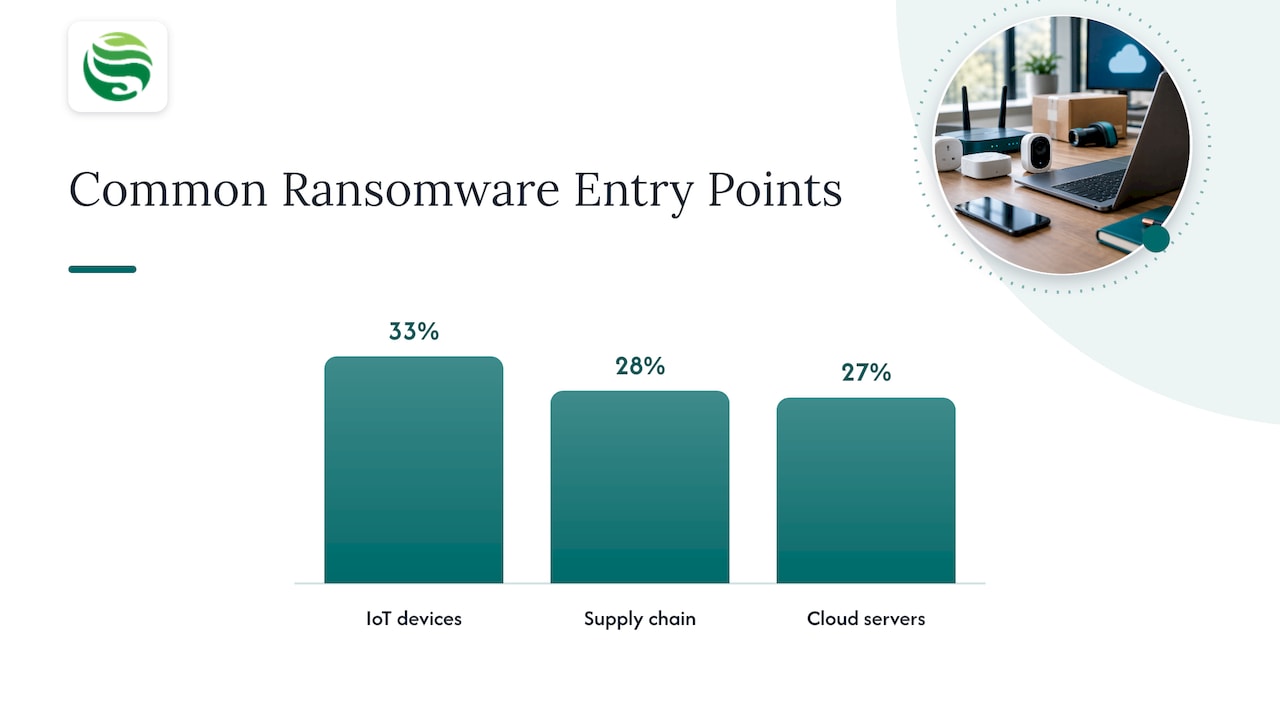
Attackers also use the less obvious routes. The Hiscox report lists Internet of Things devices (33%), supply chain weaknesses (28%) and cloud-based corporate servers (27%) among common entry points, so your device inventory and your suppliers matter as much as your laptops. Our piece on shadow IT risks shows how unmanaged tools widen that surface. If you work with software vendors, this guide to vendor security questions lists what to ask of each supplier.
Backups: the layer that decides recovery
The NCSC states that up-to-date backups are the most effective way to recover from a ransomware attack. Ransomware also actively targets backups to make payment more likely, so a copy sitting on the same network is not enough.
The NCSC’s advice for a small firm:
- Back up your most important files regularly, daily or weekly depending on how much work you could afford to redo.
- Keep one copy offline and separate from the network, ideally offsite, and do not leave a storage device connected when not in use.
- Consider both an online backup and a storage device, with 2-step verification on the online account, as the small organisations backup guidance suggests.
- Test that restoring actually works. The NCSC’s ransomware-resistant backups guidance says a backup only helps if owners regularly test and monitor its health.
- Give two people responsibility, so cover exists when the usual person is away.
One limit is worth knowing: the same guidance notes that backups do not address attackers who steal data to extort you later. That is why backups sit alongside access controls and monitoring, not in place of them.
We run backup and disaster recovery as part of our service range, and our backup testing schedule sets out how often to test and what to check.
Prepare the response before you need it
The NCSC response and recovery guide asks you to write down who owns each responsibility during an incident and how to reach them, and to make sure staff know how to restore a backup. The NCSC’s broader guidance adds identifying critical assets, planning communications and deciding in advance how you will treat a ransom demand. The official line, as Daines Kapp summarises it, is not to pay.
A one-page plan should name:
- the person who decides to isolate systems;
- your IT provider’s emergency contact, including out of hours;
- who speaks to customers, insurers and regulators;
- where the plan is kept offline, since your systems may be unavailable.
Our full ransomware response plan guide gives a template, and disaster recovery planning covers the 72-hour reporting clock. If you want help to prepare for disruption more broadly, this business continuity piece looks at who leads when normal operations stop.
If you suspect an attack now
The NCSC response guide says that if you are suffering a live attack you should call 0300 123 2040 immediately. It also says:
- Certain incidents must legally be reported to the Information Commissioner’s Office (ICO), the UK data protection regulator, whether or not your IT is outsourced.
- A cyber attack is a crime, so report it to law enforcement. In Scotland that means Police Scotland on 101 or Report Fraud.
The NCSC’s July 2026 guidance adds three points: investigate before restoring systems, because rushing recovery can raise risk; secure an NCSC-assured incident response provider in the first hours; and remember that reporting to the NCSC does not satisfy any legal reporting duty you have separately.
How managed protection carries this for you
Every layer above needs someone to run it daily: patching, monitoring, backup testing, access reviews, training. In a small firm those jobs compete with everything else. Our Security by Default approach builds security into every support package, with 24/7 endpoint monitoring, incident response and specialist escalation, so it is not an optional extra.
The pieces most relevant here are endpoint protection, Managed Cyber Security, and our Security Awareness Training and Cyber Risk Assessment, which shows where your gaps are. If you only need help occasionally, Pay As You Go IT Support is available, and our packages include out-of-hours IT support.
FAQ
What is the first step in ransomware protection for a small business?
Start with backups and MFA. Make sure you hold a tested copy of essential data that is separate from your network, then switch on multi-factor authentication for email and remote access. These two steps limit both the damage and the likelihood of a successful attack.
Does cyber insurance replace protection?
No. Insurance helps with costs and gives access to outside support, and the government’s research found very few victims had cover. It does not stop an attack or restore your systems, so it works alongside the controls above.
Should we pay the ransom?
Official NCSC guidance is not to pay. Payment does not guarantee recovery: in the Hiscox report, many payers still had to rebuild systems or faced further demands. A tested backup and a rehearsed plan are your better position.
Do we have to report a ransomware attack?
Possibly. Incidents involving personal data may have to be reported to the ICO, and the NCSC says its own reporting does not meet other legal duties. Law enforcement should also be told. Decide who handles this in your response plan.