

Vendor management for SMEs means knowing which suppliers run your email, cloud, software and support, what each can access, when each contract renews and how you leave if it goes wrong. Most small firms do not need a procurement department to do it. They need one register, a named owner per supplier and a routine. It is far easier when one provider coordinates your IT suppliers for you, which is what our outsourced IT manager service and managed IT support include through vendor coordination.
What IT vendor management covers
IT vendor management is the process of selecting, managing and reviewing the external suppliers behind your technology. A typical framework includes onboarding, contract and service-level oversight, performance monitoring and renewal planning.
For an Aberdeen or Aberdeenshire SME, the list is usually familiar: Microsoft 365 or Google Workspace, your domain and website host, accounting and booking software, cloud storage, broadband and telecoms, and your IT support provider. Each one holds some of your data or controls part of how you trade.
Step 1: build a supplier register
Start with a reliable record of suppliers: what they supply, who can access your systems through them, renewal dates, and the route out if the service ends. Pull the first list from your finance records, because anything you pay for appears there.
A simple spreadsheet works. Use these columns:
- Supplier and service
- Internal owner (one named person)
- Data held and systems accessed
- Contract start, renewal and notice period
- Risk rating and next review date
- Exit route, including how you get your data back
The commonly missed risks are dull ones: licences that lapse, former staff who still have supplier logins, and faults that get passed between two providers who each say the problem sits with the other. Shadow IT, where staff sign up for tools without telling anyone, adds suppliers you do not know about; our guide to shadow IT risks shows how to find them.
Step 2: rank suppliers by the harm they could cause
Rate each supplier by what it controls and the data it holds, not by how much you spend. One approach is:
| Rating | Typical supplier | Review |
|---|---|---|
| High | Holds sensitive or large volumes of personal data, runs a critical service or its recovery, or its failure would stop you trading | More often than yearly |
| Medium | Holds business data or runs a service with a workaround | At least yearly |
| Low | No access and no data | At least yearly |
Record “unknown” as low confidence, not low risk. Risk Ledger notes that this decides how much evidence you ask the supplier for. Bring a review forward after a breach, an ownership change, a new type of data or repeated faults.
If a supplier can reach personal data from outside the UK, that can count as a restricted transfer under UK data protection rules, so record where data is stored and accessed from. For a wider method, see our IT risk assessment guide and our walkthrough of vendor risk management.
Step 3: check the supplier before you sign
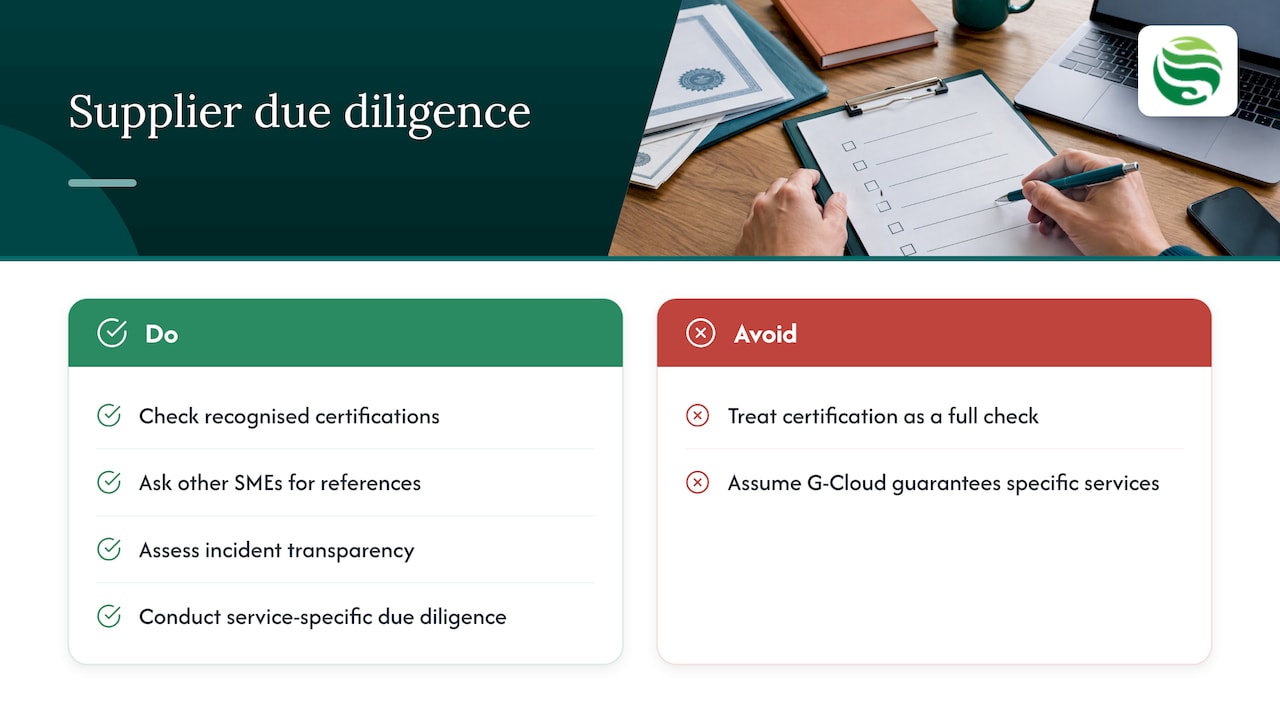
The NCSC’s guidance on choosing a managed service provider advises looking for recognised certifications such as Cyber Essentials Plus, with ISO 27001 or SOC 2 as further indicators, asking for references from other SMEs, and judging how openly the supplier talks about security incidents.
Certification is a baseline, not a full check. The National Audit Office points out that G-Cloud pre-screening only confirms suitability to work with government and gives no assurance on specific services, so you still do your own due diligence. If you are unsure which standard fits your size, read Cyber Essentials or ISO 27001. Our wider advice on choosing IT support applies the same checks to your main provider.
Suppliers outside IT matter too. A cloud tool used by your trade, a payments platform or an invoicing service all handle your data, and a guide to what to demand from every software vendor shows the questions worth asking of each.
Step 4: put security and exit terms in the contract
Per the NCSC, a managed service contract should define roles and responsibilities, incident reporting (including whether the supplier tells you when it suffers an incident), liability terms, technical reporting, service levels, access and privilege controls, and contract duration and exit clauses. It also notes that many insurers ask for recent health or configuration reports to validate a cyber insurance claim, so reporting is worth agreeing up front.
Two points deserve extra attention:
- Notification times. The NCSC says SMEs are often less resilient to downtime because every hour lost affects revenue and reputation, so agree notification timeframes scaled to severity.
- Data return. The National Audit Office advises checking data ownership and retrieval rights, data residency, liability caps and sub-processor risk. You stay responsible for your data in the cloud even when the supplier provides a secure environment.
For a worked example of response and resolution targets, see our IT SLA examples. A written record of who is responsible for what also helps with day-to-day duties; one guide to contractor records shows how to keep such evidence organised.
Step 5: monitor performance and review
Contracts only help if someone checks delivery. Choose a few measures per important supplier: response and resolution times, uptime, incidents reported and how quickly you were told. Government templates show the principle: the Model Services Agreement ties a material failure to missing a threshold on 25% or more of the indicators in a service period. You can borrow the idea: agree in advance what level of missed targets triggers a formal conversation.
A workable rhythm for a firm without procurement staff:
- Start with the group that would hurt most if compromised, such as cloud and hosting.
- Assess that group at a depth matching the harm.
- Record each decision, who accepted the remaining risk and a review date.
- Set triggers that bring a review forward.
That sequence follows Risk Ledger’s guidance for one- or two-person teams, which also warns against loading small suppliers with needless paperwork.
Where public-sector rules fit
If you bid for public contracts, the Procurement Act 2023 rules apply to procurements started on or after 24 February 2025. PPN 014 requires in-scope buyers to ensure suppliers hold Cyber Essentials or Cyber Essentials Plus, renewed annually, or equivalent controls for higher-risk contracts. Our Cyber Essentials guide explains certification in plain terms.
Taking vendor management off your desk
The register, the reviews and the chasing of suppliers are the parts owners find hardest to keep up. Abersecure provides managed IT support for businesses in Aberdeen and Aberdeenshire with vendor coordination, project oversight and Security by Default as standard. If you want one accountable party between you and your technology suppliers, see our managed IT support or outsourced IT manager pages, or look at our packages.
FAQ
What does vendor management entail for a small business?
It means keeping a register of suppliers, naming an owner for each, rating risk by the data and systems they control, agreeing contract terms and reviewing performance at least yearly. The aim is to avoid surprises such as lapsed licences or leftover access.
Which suppliers should I include?
Everything that touches your data or keeps you trading: email and productivity software, domain and hosting, accounting and booking systems, cloud storage, connectivity and outsourced IT support. Check your finance records so none are missed.
How often should I review IT vendors?
At least once a year for every supplier, and more often for high-risk ones. Review sooner after a breach, a change of ownership, a new type of data or repeated faults.
Do I need a dedicated procurement team?
No. A named owner per supplier, a simple register and a diary of review dates are enough for most SMEs. An outsourced IT manager can run that routine alongside your technology.